LEO Radar Tasking
Tutorial · Walker Star + facility-born demand
A four-plane Walker Star commanded from five real ground stations, over All Land. This is the radar-CONOPS counterpart of LEO Optical Satellite: instead of painting land in Continuous coverage, a request is born at a facility, the same satellite must see that station first, then a land point. Acquisition is spacecraft line-of-sight — no sensor. The analysis asset is named Radar Tasking Analysis.
Same hypotheses as the blog post. Numbers are sized for a 2-day window (Basic Web or Desktop). Trial is capped at 12 h and is too short for this recipe.
Open Web App · start from Create your first mission
What we will do
- Set the scenario (
RAD-TASK-Demo, 2 days, step 120 s). - Create seed spacecraft
LEO-RAD-Demo(SSO ~550 km, dawn–dusk) with nadir attitude — no sensor. - Grow a Walker Star 4 / 4 / 1 with prefix
LEO-RAD-Walker. - Add five commanding facilities from the station database.
- Add an AOI with global layer All Land.
- Run Coverage Discrete — Facility tasking (N) — named
Radar Tasking Analysis. - Open Dashboard and read chain outcomes, then the three delay clocks.
Mission card
| Field | Tutorial value |
|---|---|
| Mission name | RAD-TASK-Demo |
| Scenario | 2 days (not the default 12 h Trial window) |
| Step | 120 s (Trial / Basic minimum; do not go finer) |
| Seed spacecraft | LEO-RAD-Demo |
| Orbit wizard | SSO, altitude 550 km, MLTAN 6.0 h (dawn–dusk) |
| Attitude | Nadir |
| Sensor | None — acquirers are the spacecraft (Earth LoS) |
| Constellation | Walker Star, N=4, P=4, F=1, prefix LEO-RAD-Walker |
| Members | LEO-RAD-Walker-SAT-01-01 … SAT-04-01 (one sat per plane) |
| Facilities | SSC Madrid (partner), KSAT Punta Arenas, KSAT Inuvik, KSAT Troll (TrollSat), ESA New Norcia (Australia) |
| Facility constraint | Ground elevation min 5° |
| AOI | AOI-ALL-LAND — global layer All Land (not a country) |
| Analysis | Coverage Discrete, demand Facility tasking (N), N=200, seed=100, name Radar Tasking Analysis |
| Acquirer | Constellation All Satellites (the four buses) |
Hypotheses (same as the blog)
Radar-style tasking, not paint-the-Earth. Requests are born at a ground station. The same bus must see that facility first, then a point on All Land. Geometry is line-of-sight of the spacecraft — no SAR / optical FOV. Polar stations should show shorter TASKING wait than mid-latitude stations over a 2-day window.
flowchart LR
  SSO["SSO 550 km / 6.0 h"] --> Att["Nadir"]
  Att --> Walker["Walker Star 4/4/1"]
  GS["5 facilities"] --> Cov["Radar Tasking Analysis"]
  Walker --> Cov
  AOI["All Land"] --> Cov
  Cov --> Dash["Chain outcomes + delay clocks"]
Web plan limits
A 2-day scenario fits Basic (up to 4 days) or Desktop. Trial is 12 h only. The full card (4 expanded spacecraft + 5 facilities) needs Pro (or Desktop). Basic can run the Walker (4 satellites) with 4 facilities — drop ESA New Norcia (Australia). Trial is 1 facility and 1 expanded acquirer: you can still learn the two-leg chain on 12 h with KSAT Troll (TrollSat) + seed LEO-RAD-Demo, then grow duration and fleet on a higher plan. Walker Apply itself is Trial-friendly (N=4).
1 — Scenario
- New mission (or continue the first-mission file). Name it
RAD-TASK-Demo. - Set the scenario span to 2 days: keep the start, move the end 48 hours later (same clock, next calendar day + remainder).
- Set Scenario time step to 120 s. Trial and Basic will not accept a finer step — the UI blocks anything below 120 s.
- Apply Changes on the scenario if the header is dirty.
2 — Seed spacecraft LEO-RAD-Demo
- Right-click Spacecraft → Add Spacecraft.
- Name it
LEO-RAD-Demo. - Open the Orbit tab → Orbit design wizard → type SSO.
- Set altitude 550 km and MLTAN 6.0 h (dawn–dusk — radar-style CONOPS can look in darkness; arrays stay in sunlight).
- Click Design orbit (document). Confirm the Keplerian / state fields update to the SSO elements.
- Attitude → Nadir.
- Scroll down and click Apply Changes. Confirm the ground track in 3D (coloured marker; right-click to follow).
Do not add a sensor. Coverage will use the bus line-of-sight.
Why not a 10:00 optical SSO?
Morning MLTAN is the Landsat / optical-land pattern. This CONOPS cares about geometry and revisit, not land lighting. Dawn–dusk is the usual radar-style starting point. You can still use LEO Generic at ~550 km and ~98° if you want a non-SSO polar seed; Walker Star will copy whatever you Apply.
3 — Walker Star 4 / 4 / 1
- From the spacecraft (⋯ or context) → Create Walker Constellation.
- Seed Satellite =
LEO-RAD-Demo. - Constellation Type = Walker Star (RAAN spread over 180° — polar-style, not Walker Delta).
- Total Satellites (N) = 4, Orbital Planes (P) = 4, Walker Phasing (F) = 1.
- Set Prefix to
LEO-RAD-Walker(do not leave the defaultLEO-RAD-Demo-CONST). - Apply. Confirm four members under the constellation:
| Plane | Member name |
|---|---|
| 1 | LEO-RAD-Walker-SAT-01-01 |
| 2 | LEO-RAD-Walker-SAT-02-01 |
| 3 | LEO-RAD-Walker-SAT-03-01 |
| 4 | LEO-RAD-Walker-SAT-04-01 |
Each member inherits the seed orbit slot. Refresh the 3D scene — you should see four planes.
4 — Five commanding facilities
Add five Facility assets. For each one: pick the Facility database preset (name + lat/lon/alt fill in), then add constraint Ground elevation with min 5°, then Apply Changes.
| Order | Database preset | Why it is in the set |
|---|---|---|
| 1 | SSC Madrid (partner) |
Mid-latitude Europe (~40°N) |
| 2 | KSAT Punta Arenas |
Southern Cone (~53°S) |
| 3 | KSAT Inuvik |
High Arctic (~68°N) |
| 4 | KSAT Troll (TrollSat) |
Antarctic polar (~72°S) |
| 5 | ESA New Norcia (Australia) |
Mid-latitude Western Australia (~31°S) |
Polar sites (Inuvik, Troll) see a high-inclination LEO far more often than Madrid or New Norcia. That contrast is the experiment: TASKING wait should be shorter at the poles.
Trial / Basic subset
Trial: only KSAT Troll (TrollSat). Basic: the first four rows (drop New Norcia). Pro / Desktop: all five.
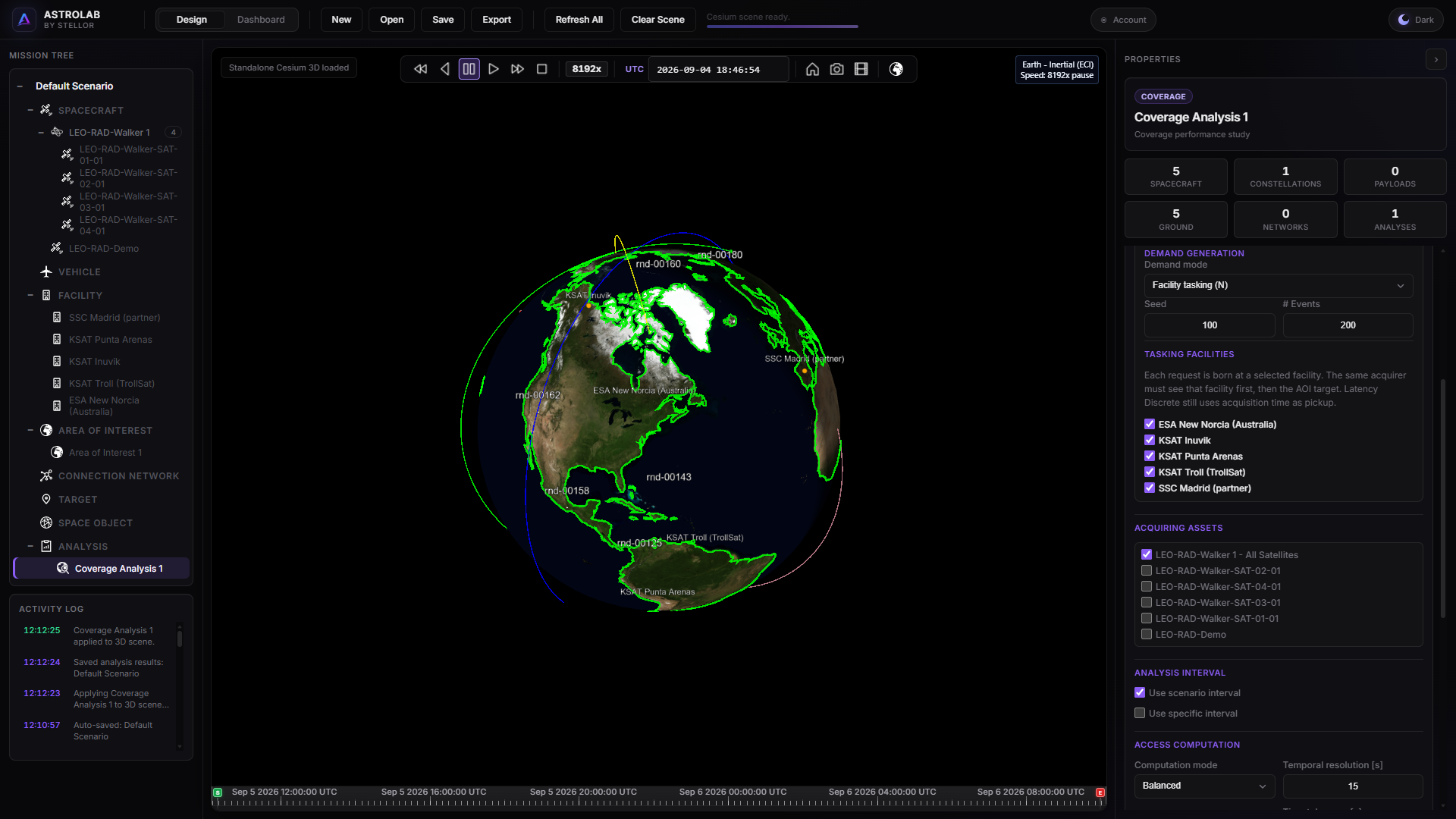
3D scene — Walker Star 4/4/1, five commanding facilities, spacecraft line-of-sight (no sensor).
5 — Area of interest · All Land
- Right-click the Area of interest category → Add.
- Name it
AOI-ALL-LAND. - Under Global Layers, check All Land. Do not pick a country.
- Apply Changes.
All Land is the Natural Earth land mask — continents, not ocean. Facility-tasking demand points are then born toward land, which matches a radar look at the surface rather than a single country box.
6 — Radar Tasking Analysis
Facility-tasking Discrete is not “paint the continents”. Each demand event is born at a checked facility. The payload to acquire is a point inside All Land. The same acquirer must see that origin facility first (TASKING), then the land target (ACQUISITION-LEG). TOTAL is birth → target (the sum of the two legs in this CONOPS). Acquisition here is geometric LoS of the spacecraft, not a sensor footprint.
- Right-click Coverage Analysis → Add. Name it
Radar Tasking Analysis. - Type Discrete.
- Demand mode Facility tasking (N). The Tasking facilities checklist appears — check every station you added.
- Demand N events 200 (about 40 per facility across the five stations), demand seed 100.
- AOI type = Area of Interest; select
AOI-ALL-LAND. - Acquirers = constellation All Satellites (the four Walker members — not the seed only, and not sensors). On Trial, select
LEO-RAD-Demoinstead. - Computation Balanced.
- Run Analysis. Wait until it finishes.
This recipe is 2 days
Two days and 200 events (~40 per origin facility) are enough to see polar vs mid-latitude tasking. They are not decision-grade response-time products. Lengthen the scenario and raise N on Pro / Desktop when the workflow is clear. Trial caps Discrete at 100 events — this N=200 recipe needs Basic or above.
Delay CDFs only include successful contacts. Misses are not plotted as infinite delay. Read Chain Outcomes for never-tasked / tasked-no-image / acquired.
7 — Dashboard
- Top bar: Design → Dashboard.
- Asset =
Radar Tasking Analysis. - Generate these plots in this order:
| Plot template | What you are looking at |
|---|---|
| Discrete Chain Outcomes by Facility | Failure modes per origin station (plot title: Radar tasking chain by origin facility). Never tasked / tasked-no-image / acquired. Start here. |
| Discrete Delay CDF by Facility | Conditional wait by origin station. Polar curves should rise sooner on the TASKING clock. |
| Discrete Facility Tasking Delay Legs | TASKING vs ACQUISITION-LEG vs TOTAL on one bar chart. |
| Discrete Acquirer Delay Range | Min / P50 / mean / P95 / P99 / max of TOTAL wait (birth → target) per spacecraft. Not ACQUISITION-LEG. |
- Click Generate Plot for each. You can also switch to Reports for tabular summaries.
Clock naming
Templates called “Acquisition Delay by Acquirer” still plot TOTAL (birth → AOI target), not ACQUISITION-LEG. The three clocks are defined in the ReportGraph glossary: TASKING = birth → origin facility; ACQUISITION-LEG = facility → target; TOTAL = birth → target.
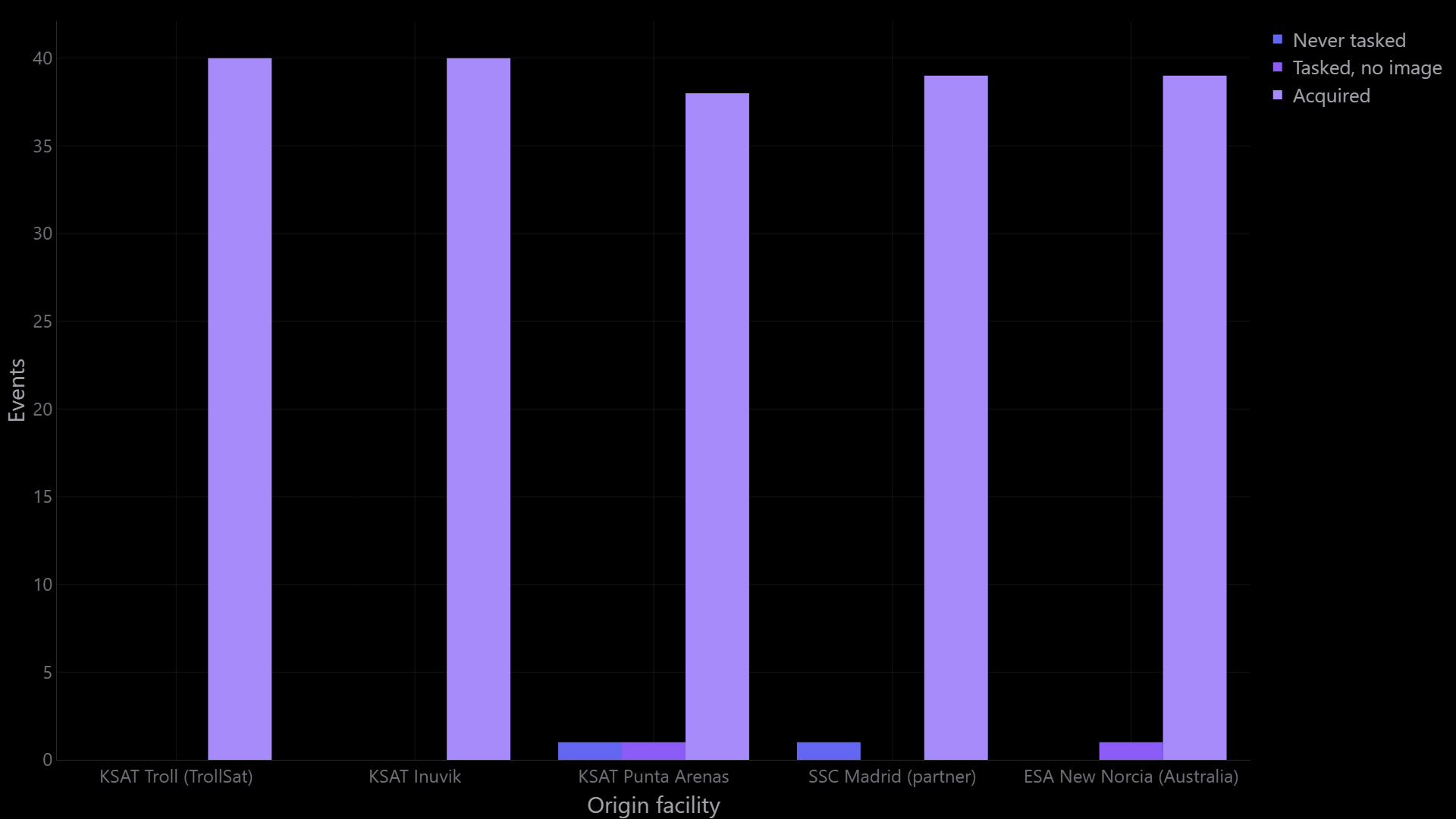
Chain outcomes by origin facility — never tasked / tasked-no-image / acquired.
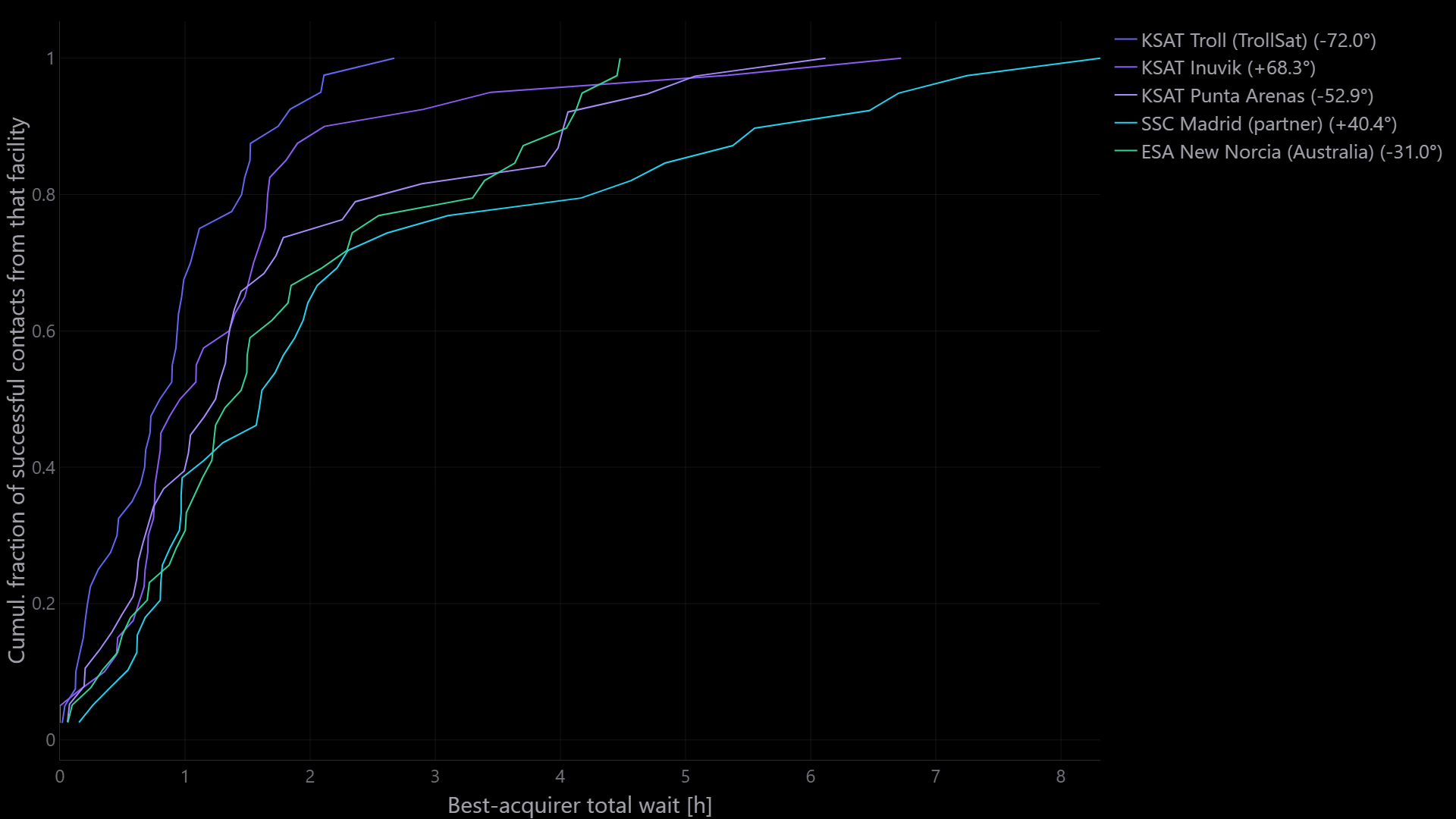
Delay CDF by origin facility — polar commanding typically rises sooner than mid-latitude stations.
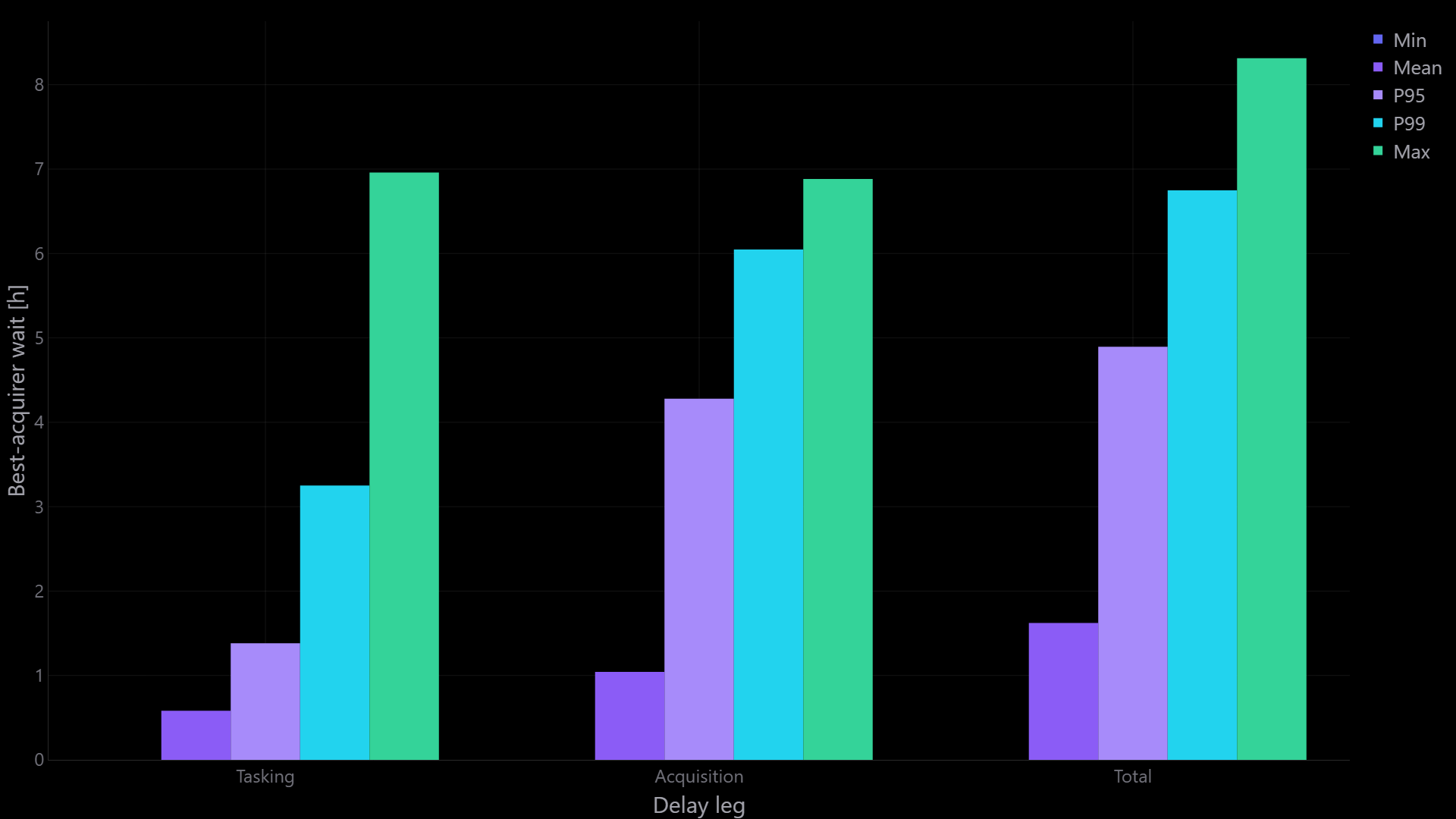
Facility tasking delay legs — TASKING vs ACQUISITION-LEG vs TOTAL.
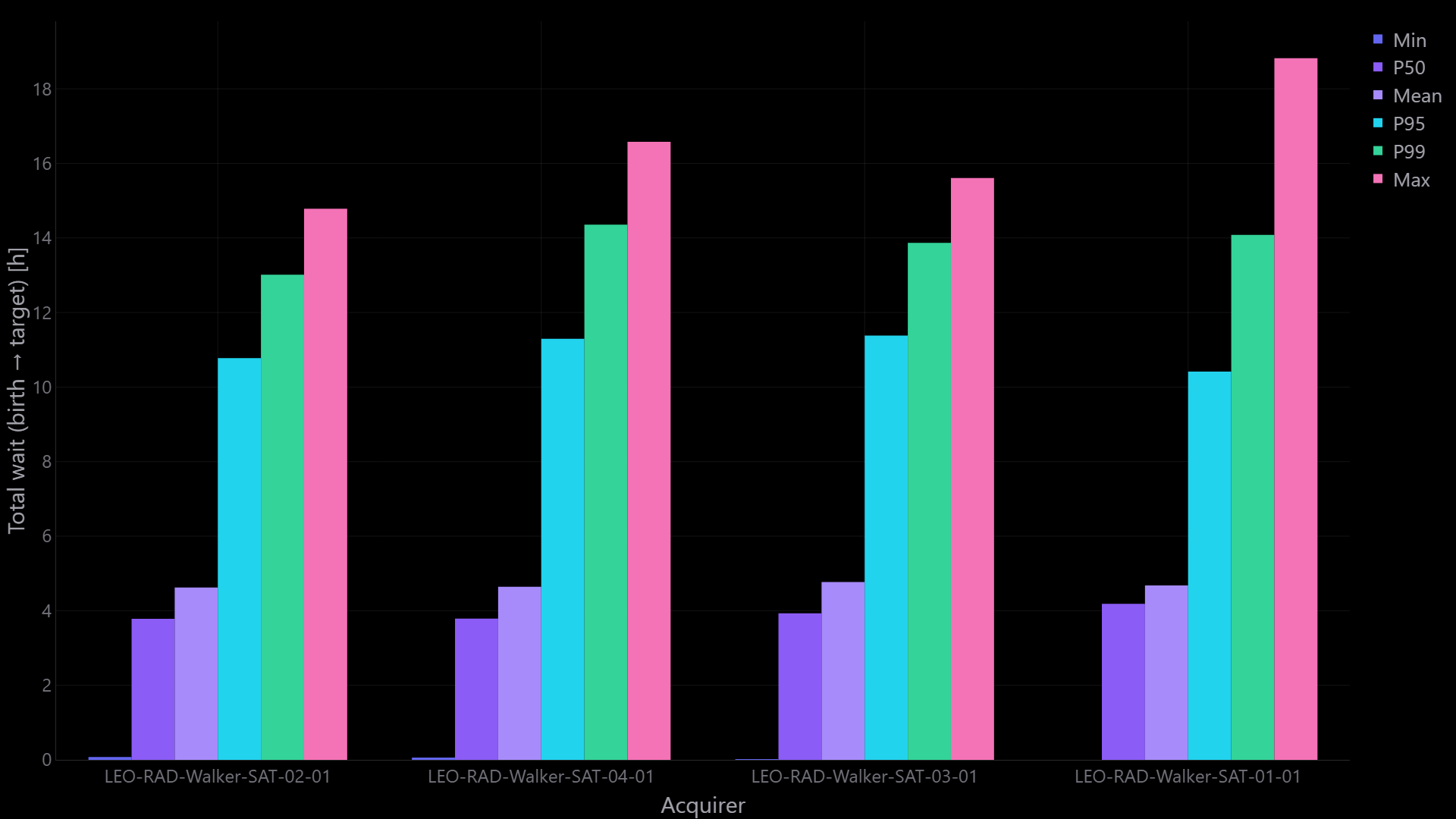
Discrete acquirer delay range — min / P50 / mean / P95 / P99 / max TOTAL wait (birth → target) per spacecraft.
Checkpoint
- SSO dawn–dusk seed
LEO-RAD-Demo, nadir, no sensor. - Walker Star members
LEO-RAD-Walker-SAT-01-01…SAT-04-01. - Commanding facilities from the database (full set or the plan subset).
- AOI
AOI-ALL-LANDwith global layer All Land. - Coverage Discrete Facility tasking (N) completed as
Radar Tasking Analysis, acquirers = All Satellites. - Dashboard: chain outcomes and at least one delay-clock plot (CDF by facility or delay legs).
Optional next (same mission)
| If you want… | Then… |
|---|---|
| A flight-like footprint | Mount a sensor later and switch acquirers to All Sensors |
| Stronger polar vs equatorial contrast | Keep Troll + Inuvik; drop Madrid or New Norcia and re-run |
| Imaging-only Discrete (no uplink) | Demand random N in AOI — requests are born on the land point, not at a GS |
| Delivery after the look | Connection Network + Latency pointed at this Discrete coverage (Latency still uses TOTAL as pickup) |
| Paint-the-Earth products | Separate Continuous coverage on the same Walker |