Analyses
Studies you run on a configured mission
An analysis is an item in the Mission Tree. You point it at spacecraft, sensors, facilities, or other studies, then Apply Changes and Run Analysis. When it finishes, look at overlays in Design and plots in Dashboard.
How to click through the workspace: Running analyses · Reporting.
Open Web App · first study: LEO optical mission
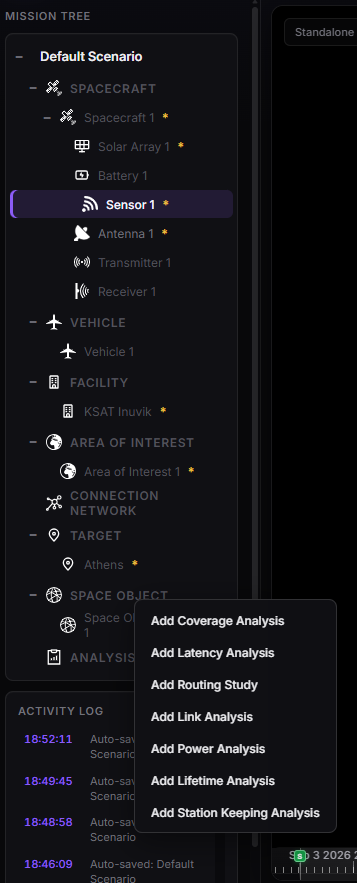
Mission Tree — analyses under Analysis, after a completed run.
Which study?
| Analysis | Question it answers |
|---|---|
| Coverage | How well does my fleet serve a region or a set of requests? |
| Link | When can A see B — and, optionally, is the RF hop good enough? |
| Connection network | What operational mesh (ISL + ground) am I allowed to use? Ends can be buses or laser / dump-antenna sensors. |
| ISL routing | How does a command or a file ride that mesh (CGR, hops, radios)? Sensors on the CN collapse to the parent bus. |
| Routing Analysis | Which is the best route from a source to the best of several targets, and which target / relay is used most? |
| Latency | After I acquire, how long until data reaches a gateway? (scan, EO, radar, IoT packets, session, detection) |
| Coverage and latency clocks | Generation, Tasking, Acquisition, Delivery — which delay is which |
| Power | Do arrays, batteries, and loads keep the bus alive through eclipse? (Beta 0.1.0 first cut) |
| Lifetime | How long until uncontrolled decay / re-entry? (Beta 0.1.0 first cut) |
| Station keeping | What Δv does it take to stay? (Beta 0.1.0: LEO altitude + GEO analytical) |
| Dashboard plots | Charts and tables from a completed run (does not recompute physics) |
flowchart TD
  Assets["Spacecraft, sensors, facilities, AOI"] --> Cov["Coverage"]
  Assets --> Link["Link"]
  Assets --> CN["Connection Network"]
  CN --> ISL["ISL routing"]
  CN --> Route["Routing"]
  Cov --> Lat["Latency"]
  CN --> Lat
  Cov --> ISL
  Lat --> ISL
  SC["Spacecraft + arrays + battery"] --> Pow["Power"]
  SC --> Life["Lifetime"]
  SC --> SK["Station keeping"]
  Cov --> Dash["Dashboard"]
  Link --> Dash
  CN --> Dash
  Route --> Dash
  Lat --> Dash
  Pow --> Dash
  Life --> Dash
  SK --> Dash
Coverage, Link, Power, Lifetime, and Station keeping can stand alone. Routing needs a Connection Network. Latency needs both Coverage and a Connection Network. ISL routing is the opt-in planner those two studies call (command on Coverage facility-tasking, dump on Latency). Every completed run is read in Dashboard (Design overlays are extra, not the only product).
Shared rules
- Name the analysis clearly — it appears in the tree and in Dashboard.
- Apply Changes, then Run Analysis (tree menu or the button in Properties).
- Wait for completed. Stale means something the study used changed — not every edit (a rename does not). What invalidates what: Stale analyses. Failed — read the message in Properties or the Activity Log.
- In Dashboard, select this analysis, not only the spacecraft, for coverage / link / latency products.
- Plan limits (grid size, Discrete N, scenario length) can block a run — Account and access.
Related
- Running analyses · Stale analyses · Reporting · Constraints
- Technical picture (optional): Flight dynamics · Contact Graph Routing · Independent verification