Latency
From acquisition to delivery on the network
Latency asks: once Coverage has the data, how long until it reaches a gateway? Coverage answers when you see the Earth (or an event). Latency moves bytes from the acquirer to a facility on a Connection Network — through onboard MMFU and downlinks.
The clocks are not the same interval. Coverage and latency clocks is the naming page: Acquisition delay vs Delivery delay, plus Tasking / Look when there is facility-tasking.
It needs:
- A Coverage run (Continuous, Discrete, or Static), and
- A Connection Network that connects those acquirers to ground stations.
Add from Mission Tree → Analysis → Latency.
Walkthrough: LEO optical mission.
Clocks in one line
| You care about… | Clock | Page |
|---|---|---|
| Time until the satellite takes the order | Tasking delay | Clocks |
| Time from order until information is onboard | Look delay | Clocks |
| Time from generation until information is onboard (Discrete, or IoT packets) | Acquisition delay | Clocks |
| Time until the bytes are on the ground | Delivery delay | Clocks |
| How stale the ground picture is | Age of Information | Clocks |
| How old data is still onboard | Pending latency | Clocks |
| Session user visible but not served | Unattended | Clocks |
Delivery delay is Acquisition → Delivery. It is never Generation → Delivery.
Same clocks as on Coverage and latency clocks. T1 is facility-tasking only. Latency owns Delivery delay (T2 → T3).
When to use
| Use Latency when… | Prefer something else when… |
|---|---|
| Time-to-ground, backlog, overflow, delivery success | Percent area / revisit → Coverage |
| You already have Coverage + a network | Best route from one node to its targets over time, without data volumes → Routing |
| Imaging, tasking, IoT, detection, or a scanning mapper as data | One-hop RF margin → Link |
Operational stories
Latency does not have its own “type” dropdown. The linked Coverage type plus the payload / traffic model pick the story.
| Story | Coverage | Latency model | Idea |
|---|---|---|---|
| Systematic scan | Continuous grid | Produce while the swath is on the AOI (no extra payload panel) | Mapper always collecting as it flies — bytes into MMFU whenever Coverage says the cell is acquired |
| EO imaging | Discrete — Random N (or Poisson) in the AOI | Either Discrete payload: rate × window or Fixed payload size | A scene is taken when the sensor sees the point; you choose how many bytes that scene is; dump on the next ground pass |
| Radar tasking | Discrete — Facility tasking | Same two Discrete payload models (often rate × window on the bus) | Command generated at a station; Latency starts at Acquisition (end of Acquisition delay), then Delivery delay to the gateway |
| IoT packets | Static sites | Fixed packet (IoT) | Each site emits messages. CGR picks the spacecraft that picks each one up and the path to ground: Acquisition delay then Delivery delay |
| Continuous session | Static sites | Continuous session | Standing users carried live end to end (no MMFU): Served / Unattended / No coverage |
| Detection (e.g. wildfires) | Discrete — Random N / Poisson in the AOI | Same two Discrete payload models (fixed size is typical for an alert) | Acquisition delay is Generation → Acquisition; Delivery delay is Acquisition → Delivery |
Beta 0.1.0 default is Direct downlink (acquirer → facility). ISL (CGR earliest delivery) is opt-in on the same Latency asset — see Routing policy and ISL routing. Names: Coverage and latency clocks.
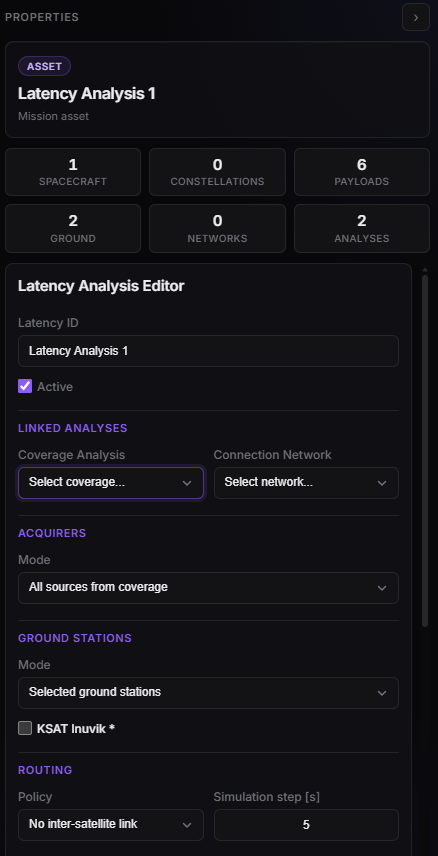
Latency Properties — linked Coverage and network, acquirers, payload.
Shared editor inputs
These fields are always there. Discrete payload and Static traffic blocks appear only for those Coverage types. Continuous has no extra payload panel — produce rate is the COMM / sensor Acquisition data rate whenever the swath is on.
| Field (editor) | Meaning |
|---|---|
| Latency ID | Name in the tree and Dashboard |
| Active | Off → skipped on scene refresh |
| Coverage Analysis | Completed Coverage to pick up. Mode (Discrete / Static / Continuous) is shown under the dropdown. |
| Connection Network | Completed network. Gateways are facilities on this graph, not every facility in the mission. |
| Acquirers → Mode | All sources from coverage or Selected acquirers only |
| Ground Stations → Mode | All facilities on network or Selected ground stations. All facilities means every facility that is already an endpoint of the linked Connection Network — including stations reached because you picked {network} - All Stations on a CN edge. |
| Policy | Direct downlink or ISL (CGR earliest delivery) — below |
| Simulation step [s] | How often the data-plane is stepped (default 5). Finer → slower run, tighter MMFU timeline. |
| Interval | Follows the scenario window |
Changing Coverage, the network, COMM, or these fields makes Latency stale — run again.
Routing policy and ISL
| Policy (editor) | What the file does |
|---|---|
| Direct downlink (default) | The acquirer holds data in MMFU until it sees a selected facility. Spacecraft–spacecraft CN edges are ignored for this dump. |
| ISL (CGR earliest delivery) | At the spacecraft that holds the file, CGR picks the next hop on the linked Connection Network. Only that radiation is reserved. The neighbour asks again. Hop count does not cap the path. |
Draw Connection Network edges acquirer → facility for Direct (the bus, or a dump-antenna sensor on that bus). For ISL also declare spacecraft–spacecraft edges — buses or laser sensors — or a constellation aggregate, then run the CN. Sensor terminals collapse to the parent: dump windows on one bus are unioned; each ISL laser keeps its own radio. Hop rate is the slower of the two buses’ ISL Data Rate. X-band hop is min(bus Downlink Data Rate, facility Max. RX Data Rate). Example: two lasers and a dump dish.
flowchart LR
  subgraph d [Direct dump]
    A1["Acquirer MMFU"] --> GS1["This bus's X-band GS"]
  end
  subgraph c [CGR dump]
    A2["Spacecraft that holds the file"] --> N["Next hop CGR just reserved"]
    N --> Ask["Neighbour asks again"]
  end
The next hop is a station when that delivery is the earliest. The fill curve is sampled with the simulation step. The bytes themselves move at file birth, contact edges, and the end of each radiation.
CGR minimises projected arrival time. Hop count only breaks a tie. A long path can queue on one radio. Worked cases: ISL routing. Official algorithm and limits (CCSDS SABR, IETF CGR, NASA ION): Contact Graph Routing.
Radio occupancy is CGR-ETO (Earliest Transmission Opportunity, as in ION 3.6+). Each hop books only its radiation interval, size / rate, on one radio of the right class and on that contact's queue. A later booking does not close an earlier gap. Radio classes: ISL (Max. Concurrent ISL Links), X-band (Max. Concurrent Downlink Links), and for Static IoT the uplink from the site (Max. Concurrent Uplinks). Details: CGR-ETO.
| Latency case | Routing |
|---|---|
| Continuous, Discrete | One fleet contact plan. CGR-ETO per hop from the spacecraft that holds the file. |
| Discrete, event seen by several spacecraft | One file per event. When the event is generated, the planner asks CGR which candidate spacecraft would put it on the ground earliest (given everything already booked) and only that one acquires it. The others spend no MMFU or radio on it. Dashboard: Event Assignment (per event), Acquisition vs Delivery Winners, Event Assignment Outcome and Assignment Gain Histogram. |
| Static IoT | Same fleet plan. Each site is a client node with uplink contacts to the spacecraft it sees. CGR-ETO chooses the spacecraft that picks the packet up and the rest of the path. |
| Static Session | Not store-and-forward, so not CGR. A live flow allocation over the same links: Continuous session. |
Ground Stations any (combined delivery): the file is delivered when it reaches any selected facility, not a named one.
MMFU and COMM
Latency is a data-plane study. RF EIRP / G/T live on Link. Bytes and rates live on Spacecraft — COMM (vehicles share that profile). Facilities add ingest rate on Facility.
| Piece | Role in Latency |
|---|---|
| MMFU capacity | Onboard store. Produce writes here; overflow if full (not delivered). |
| Acquisition data rate | Produce while Coverage is acquiring, if the acquirer is the bus. If Coverage’s acquirer is a sensor, use that sensor’s Acquisition data rate; bytes still land in the parent MMFU. |
| Downlink data rate | Space → ground hop: min(this, facility Max. RX Data Rate). |
| ISL data rate | Spacecraft → spacecraft hop under ISL (CGR). Pair rate = min of the two buses. Unused on Direct. |
| Processing latency | Added when this bus receives ISL bytes (relay), and/or at the facility when the file lands. |
| Max. Concurrent ISL Links / Downlink Links | Independent radios (default 1 each). ISL is per CN laser when those sensors are the mesh ends; otherwise per spacecraft. X-band dump stays on the bus. CGR-ETO books radiation intervals on one radio. A later booking does not close an earlier gap. |
| Uplink Data Rate / Max. Concurrent Uplinks | Static only. Receive side for ground clients: IoT packets and Session users. Continuous and Discrete ignore both, so two sensors acquiring on one spacecraft never compete for them. |
| Facility COMM | Ground ingest (Max. RX Data Rate). Max. Concurrent RX Links caps dumps into that station (default 999, effectively no limit). The station has no storage limit. |
Sensors count under their parent spacecraft in every mode. In Static, a site that only a sensor sees still uplinks to that sensor's bus. The windows of all sensors on one bus are merged, and their MMFU, uplink and radios are the bus's.
On the Connection Network, a sensor used as a laser or dump antenna is not a second radio node. Routing and this dump inherit its geometry on the parent bus (see Sensors as ISL / dump terminals). The nadir imager used in Coverage stays off that graph unless you also put it on a CN row.
Discrete (with or without facility tasking) always offers two payload models — see Discrete payload. Continuous has neither: it produces for as long as Coverage marks the grid acquired.
Systematic scan (Continuous)
Idea: a mapper that keeps collecting while the instrument is over the region — pushbroom / scanning swath, not one snapshot per point. Continuous Coverage paints the AOI grid; Latency treats every acquired cell-time as production into MMFU at the sensor (or bus) Acquisition data rate, then dumps on the next ground pass (Direct) or over ISL (CGR).
That is the contrast with Discrete EO imaging: Discrete is this scene, this instant; Continuous is the belt on the ground for the whole pass. Overflow is the usual risk: the swath may write faster than dumps can drain.
| Setup | Typical choice |
|---|---|
| Coverage | Continuous — granularity and AOI as in the mapping study. Acquirer = sensor with FOV / swath. |
| Latency | Shared fields only (no Discrete payload / Static traffic panel) |
| Network | Imaging spacecraft → dump facilities, or a dedicated dump-antenna sensor on that bus. Add spacecraft–spacecraft edges (or +V/−V laser sensors) if Policy is ISL (CGR). Terminals collapse to the parent; dump windows union, ISL radios stay per laser. |
| COMM | Imaging sensor Acquisition Data Rate only; parent MMFU, Downlink Data Rate, and ISL Data Rate if dumping over the mesh |
Walkthrough: LEO optical mission. Add Latency on that completed Continuous run when you care about time-to-ground and memory, not only where the swath fell.
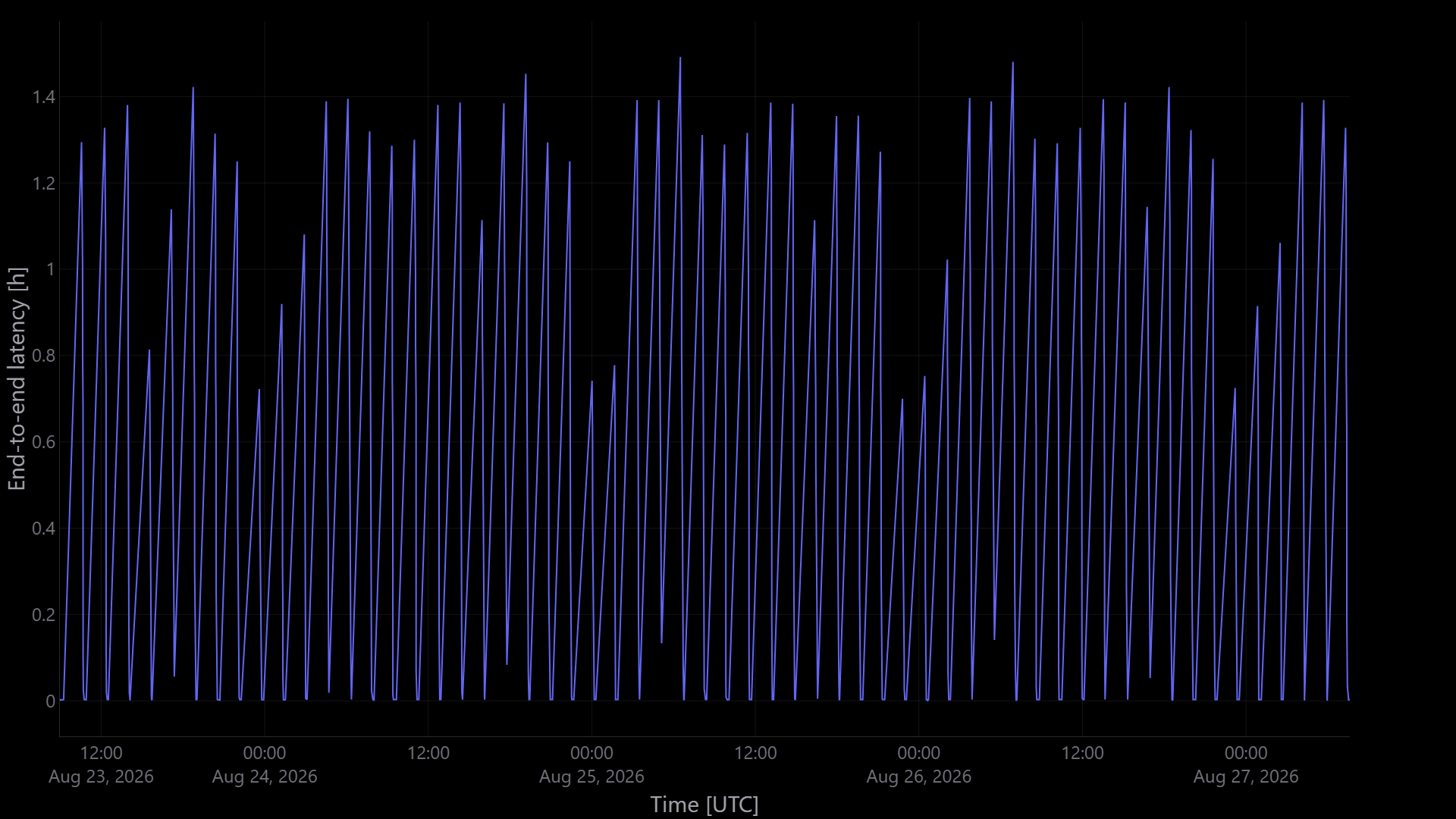
Delivery delay vs time — systematic scan (Continuous Coverage, produce while the swath is on).
EO imaging
Idea: planned or opportunity imaging. Discrete points in the AOI are scenes (no facility-tasking chain). Coverage records when each sensor (or bus) sees the point; the first one sets Acquisition delay. Latency then writes one message per scene, on the candidate that would put it on the ground first (event assignment). Its Acquisition is the moment that spacecraft sees the point, and Delivery delay runs until a gateway has the file (Direct = this bus’s X-band; CGR = planned ISL then dump).
How many bytes is that message? Discrete without tasking uses the same two payload models as radar and detection — pick one in Model:
| Model | Bytes into MMFU |
|---|---|
| Acquirer rate × acquisition window | Sensor (or bus) Acquisition data rate × Acquisition duration [s] / 8. Use when scene size grows with how long you integrate / scan. |
| Fixed payload size | The size you type (Payload size + unit). Acquisition rate is not used for the message. Use when the product is a known file (compressed scene, thumbnail, packet). |
| Setup | Typical choice |
|---|---|
| Coverage | Discrete — Random N in AOI (or Poisson). Acquirer = sensor with FOV. |
| Latency payload | Either model — rate × window is the usual imaging default; switch to Fixed payload size if the product size is known |
| Network | Each imaging spacecraft → the dump facilities |
| COMM | Sensor Acquisition Data Rate (needed for rate × window); parent MMFU, Downlink Data Rate, and ISL Data Rate if Policy is CGR |
Watch overflow if scenes are large and dumps are rare. Acquisition is the end of Acquisition delay, not a facility-tasking chain.
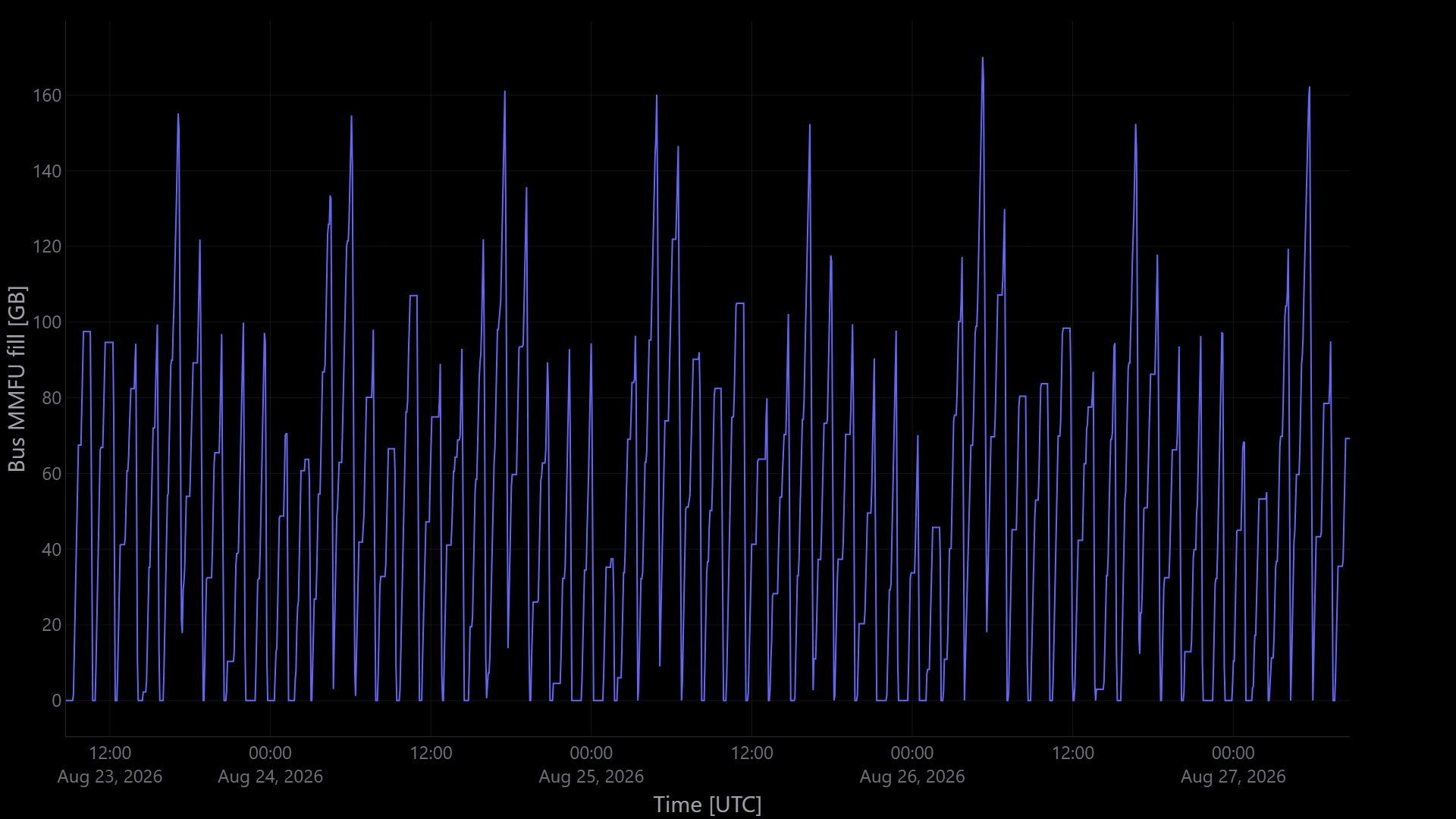
Bus MMFU fill — EO imaging; sawtooth is produce then dump to ground.
Radar tasking
Idea: a request is generated at a ground station. Direct Coverage requires the same spacecraft to see that station, then the land point. Coverage ISL command can land the order on a neighbour first (Coverage — facility tasking). Latency does not replay Tasking delay / Look delay. It starts at Acquisition and measures Delivery delay (Direct X-band or CGR dump).
| Setup | Typical choice |
|---|---|
| Coverage | Discrete — Facility tasking (N) or Poisson. Acquirer = spacecraft (no sensor in the radar tutorial) or a nadir sensor. |
| Coverage command | Direct, or ISL (CGR) with Command receivers = uplink radios |
| Latency payload | Same two models as EO: Acquirer rate × acquisition window (bus rate) or Fixed payload size |
| Latency dump | Direct, or ISL (CGR) independently of the command policy |
| Network | Tasking / dump facilities on the graph with the fleet; sat–sat edges (or laser sensors) if either policy is CGR. A nadir acquirer does not need to be a CN endpoint. |
| COMM | Imaging Acquisition Data Rate (sensor or bus); parent MMFU, Downlink Data Rate, ISL Data Rate |
Chain outcomes (never tasked / no image) stay on Coverage; Latency only sees events that were acquired.
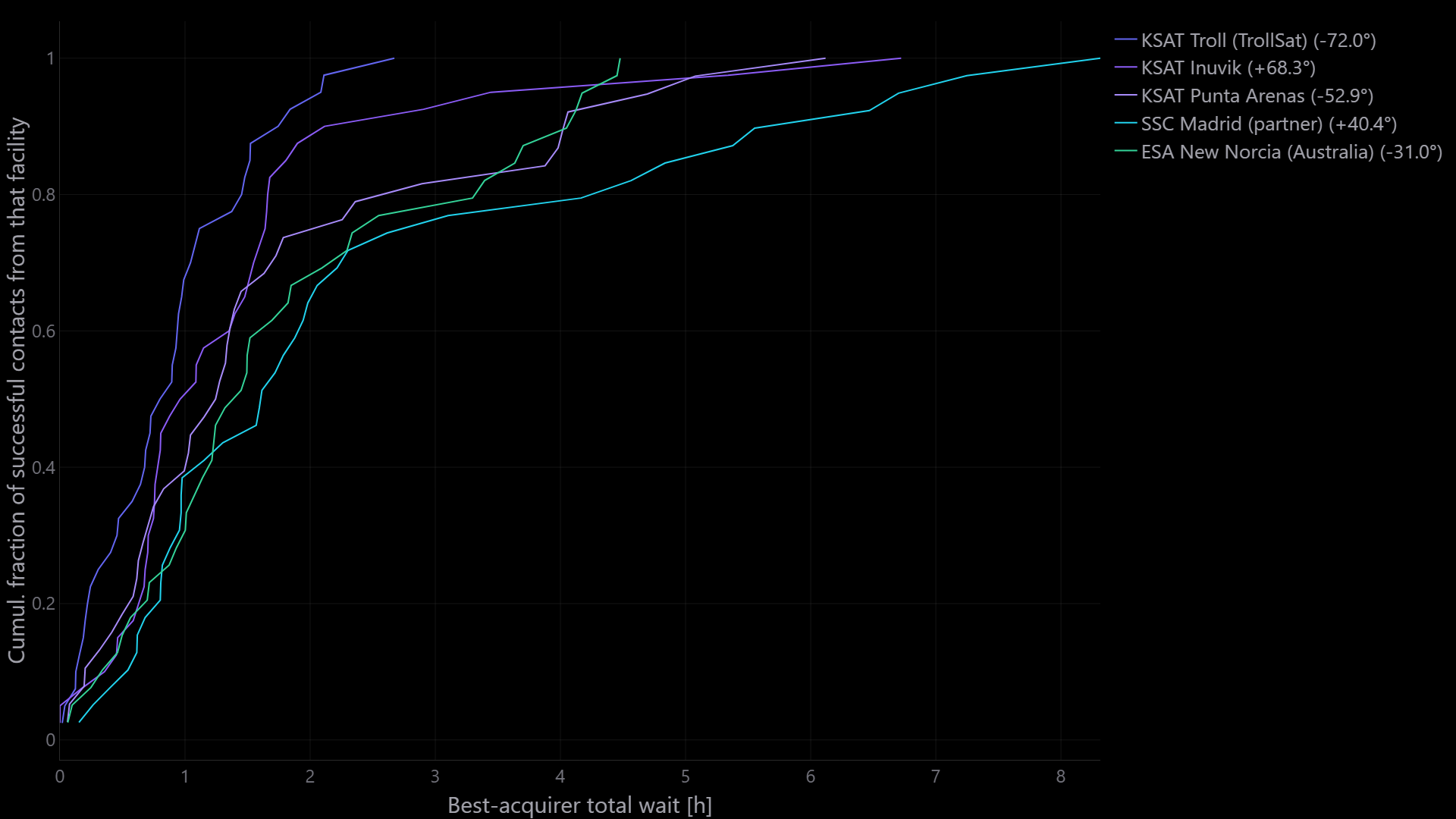
Delay CDF by origin facility. Polar stations typically rise sooner.
IoT packets
Idea: many fixed users that emit messages, not events that appear once. Static Coverage plants N sites and answers geometry (reachability, access, availability, blind gaps). Latency then generates packets at those sites.
Coverage Static has no Generation. The packet is born in Latency (t_birth at the site). That is why Acquisition delay appears here even though Coverage Static has no delay clocks.
Do not add the two clocks. Coverage reachability / gaps are not these delays.
How a packet moves. Every site is a client node in the same contact plan as the fleet. Its uplink contacts are the Coverage access windows between the site and each spacecraft (a sensor's windows count for its parent bus). A packet is born on its client at Generation. CGR-ETO (earliest delivery) then plans it like any other file:
- From the client, CGR picks the uplink. The spacecraft it lands on is the acquirer. Arrival there is Acquisition.
- The packet enters that spacecraft's MMFU and continues exactly like a Continuous or Discrete file: ISL if Policy is CGR, then X-band to a gateway.
- The uplink is a radio like the others: rate = the spacecraft's Uplink Data Rate, parallel clients = Max. Concurrent Uplinks. When all of them are busy the packet waits on the ground for the next opportunity.
So the acquirer is the spacecraft on the route that gives the earliest delivery. A packet still on its site when the window closes was never acquired. The dashboard counts it as Simulation end: a spacecraft was in view, and no path to a gateway finished before the run stopped.
If no satellite is in view. Generation stays on the clock: a site emits even when the sky is empty. The editor then chooses what that packet does.
| Choice | What happens |
|---|---|
| Wait and upload (default) | The packet stays on the site until a later pass, then CGR plans it. Existing studies keep this behaviour until you change the field and run again. |
| Drop the packet | If no spacecraft is in view at the birth instant, the packet is lost. It is not stored for a later pass. The drop reason is Not in view. |
A packet born inside a pass still enters the network. CGR may still hand it to a later spacecraft when that path reaches the gateway sooner. Not in view is only the empty-sky case. No acquirer contact remains the Wait-and-upload name for a site that never sees a spacecraft after birth. Simulation end is a packet that had a pass and was still on the site when the window closed, because no downlink to a gateway finished in time. A longer run could still deliver it. It is the same idea as a discrete file left aboard at the end of the window, except this packet never left the site.
| Setup | Typical choice |
|---|---|
| Coverage | Static — # Targets + Seed in the AOI |
| Latency traffic | Fixed packet (IoT) — packet size, generation rate (msg/s, msg/min, msg/h), and If no satellite is in view |
| Network | Serving spacecraft → gateways (plus sat–sat edges if Policy is CGR) |
| COMM | Uplink Data Rate + Max. Concurrent Uplinks for the sites; MMFU and Downlink Data Rate for the dump; ISL Data Rate if Policy is CGR |
Packet size matters twice: it sets the uplink radiation time (size / Uplink Data Rate) and the bytes in MMFU and on the dump.
Dashboard (IoT):
| Question | Plots / reports |
|---|---|
| Headline | Summary, Message Results, Drop Reasons, Delivery Outcome, Demand vs Outcomes |
| Who acquired, and how well | Pickup by Acquirer, Acquirer Results, Messages vs Time |
| Which sites suffer | Client Results, Client Outcomes Map, Not in View Map, Acquisition Delay Map, Delivery Ratio Map, Generation to Delivery Map |
Each packet is one file. If several spacecraft are in view, the study keeps the single route that reaches a gateway soonest. It does not send a copy to each of them. Not in view is the empty-sky loss from Drop the packet. Simulation end is a pass that left the packet on the site because no downlink finished before the window closed. | Clocks | Acquisition delay histogram, Delivery delay histogram, Generation to Delivery (table, vs time, CDF, CDF by acquirer), Delivery Delay CDF (+ by acquirer) | | Fleet and network | MMFU Fill by Node, Peak MMFU, Packets by Satellite (originated / relayed / dumped), Satellite Usage, Mean Hops, Hop Histogram, Cumulative Deliveries |
Generation → Delivery is Acquisition delay + Delivery delay: the latency the IoT user sees. It is shown under that name and is never called Delivery delay. Drops are overflow, no path, or — with Drop the packet — a birth while nobody was in view. Those are not Coverage blind gaps.
Walkthrough for a Walker + capture recipe (Discrete events, not this packet model): Walker IoT. For Latency packets, pair Static Coverage with Fixed packet.
| Field (editor) | Meaning |
|---|---|
| Packet size + unit | Bytes per message (B / KB / MB) |
| Generation rate + unit | How often each site emits |
| If no satellite is in view | Wait and upload (default): keep the packet for a later pass. Drop the packet: lose it when the sky is empty at generation. |
Continuous session
Idea: the same Static sites, but as standing users (Starlink-like), not a packet stream. Coverage still only says who is geometrically in view. Latency then decides, moment by moment, which users get a live end-to-end session: site → spacecraft → (ISL) → gateway, with nothing stored onboard.
Unattended is not a Coverage gap. A Coverage blind gap / low availability means nobody was in view. Unattended means a satellite was in view and the client still did not get a session.
Miss the first hop → No coverage. Miss the second → Unattended (no path or network busy).
| Name | Meaning | Owner |
|---|---|---|
| No coverage | No acquirer in view | Same geometry as Coverage reachability / availability |
| Unattended — no path | In view, but no live chain to a gateway right now | Latency |
| Unattended — network busy | A chain exists, but its uplink, ISL, downlink or station capacity is already taken by other sessions | Latency |
| Served | Carried end to end to a gateway at the session rate | Latency |
There is no Delivery delay for a session: nothing waits in MMFU. The KPI is time — served, unattended, no coverage — plus service ratio (served time over the whole interval, so no-coverage time counts against it), handoffs and ISL hops.
How sessions are allocated (flow allocation). At each moment the live links form a capacity network:
| Link | Capacity in sessions |
|---|---|
| Site → spacecraft | Coverage access (sensor windows count for the parent bus). Uplink Data Rate / session rate, capped by Max. Concurrent Uplinks |
| Spacecraft → spacecraft | Live CN edge (if Policy is CGR). ISL Data Rate / session rate, on at most Max. Concurrent ISL Links neighbours per CN laser (or per bus if the CN has no ISL sensors) |
| Spacecraft → gateway | Live CN edge. min(Downlink Data Rate, station Max. RX Data Rate) / session rate, on at most Max. Concurrent Downlink Links stations |
| Gateway | At most Max. Concurrent RX Links spacecraft (default 999) |
A min-cost flow then serves as many users as the network can carry. Among equal solutions it prefers fewer ISL hops and keeping each user on the spacecraft that already serves it (fewer handoffs). The allocation is solved again only when a link opens or closes. That check is made every Simulation step, so edges are accurate to one step (default 5 s). Without storage, the network at one instant does not depend on the previous one, so solving each change is the optimum over the whole interval.
| Setup | Typical choice |
|---|---|
| Coverage | Static — same N sites as IoT |
| Latency traffic | Continuous session — Session rate (bps…Gbps), not packets |
| Network | Serving spacecraft → gateways (plus sat–sat edges if Policy is CGR) |
| COMM | Uplink Data Rate + Max. Concurrent Uplinks; Downlink Data Rate + Max. Concurrent Downlink Links; ISL Data Rate + Max. Concurrent ISL Links if Policy is CGR. MMFU is not used. |
Crowding shows up as Unattended — network busy. The IoT Acquisition delay plots do not apply.
Dashboard templates (same products as the SCL testbench Session plots):
| Question | Dashboard template | SCL PNG |
|---|---|---|
| How many users are on at each instant | Served Sessions vs Time | 01_served_vs_time |
| Who is served, geographically | Service Ratio Map | 02_service_ratio_map |
| Polar vs equatorial service | Service by Latitude | 03_service_by_lat |
| Time in each state | Service Time Totals | 04_time_breakdown |
| Direct vs ISL hops | ISL Hops | 05_isl_hops |
| Radio load over time | Downlink / Uplink / ISL Utilisation vs Time | 06–08_util_*_vs_time |
| Which spacecraft is loaded | Mean Utilisation by Spacecraft | 09_util_mean_by_sat |
Also: Summary, Client Results, Scheduler Stats, Bus Results, Bandwidth Utilisation table, status pie, clients per bus, unattended / service-ratio / handoffs histograms, and maps of status, served, unattended (no path / busy) and no coverage.
| Field (editor) | Meaning |
|---|---|
| Session rate + unit | Continuous-session model only. Sets how many sessions each link can carry. There is no packet size: a session is a rate, not a file. |
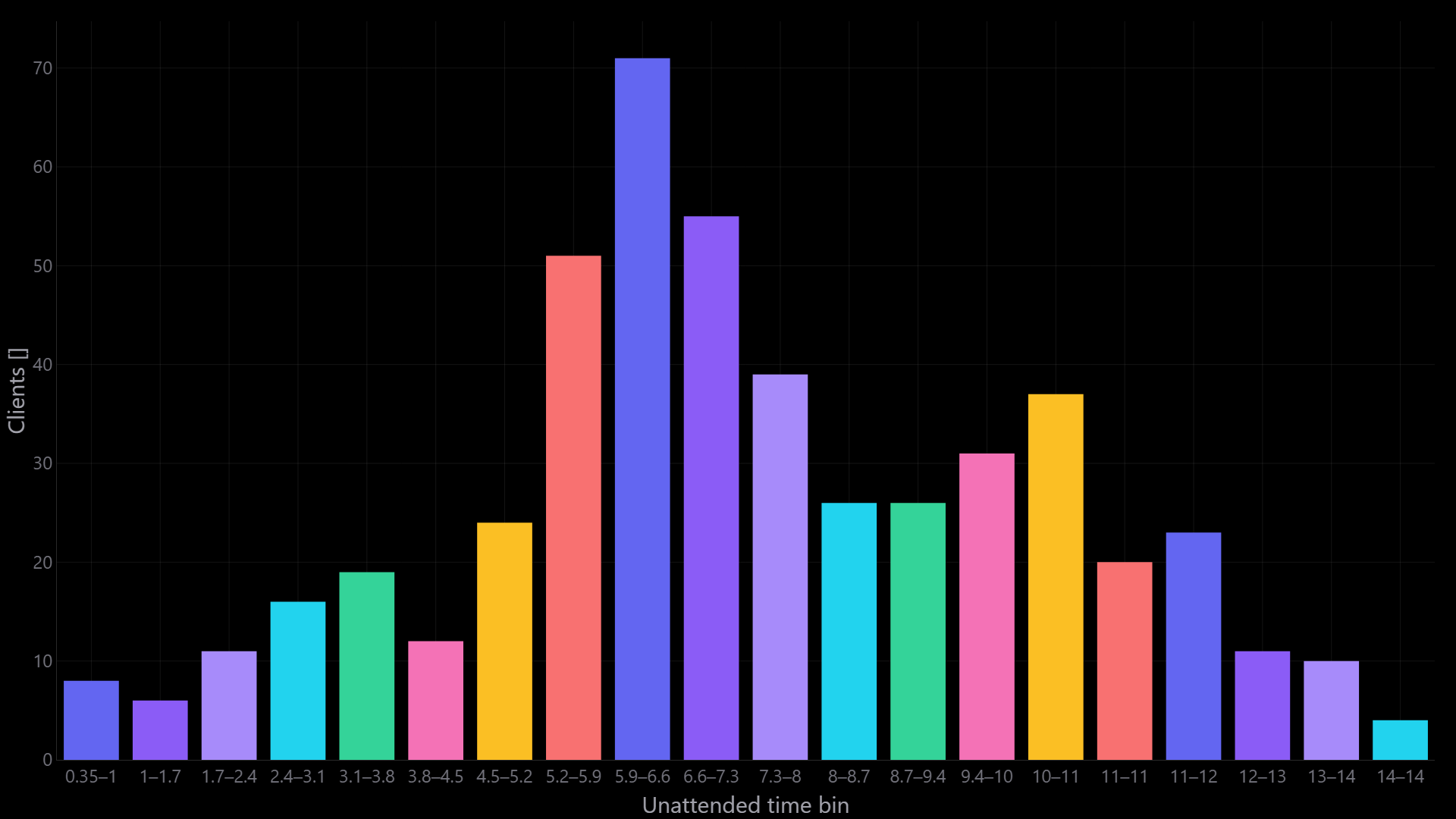
Unattended time by client — Continuous session on Static sites (in view but not served). Not Coverage availability.
Detection (wildfires and similar)
Idea: unplanned Discrete events in the AOI — a fire, a ship, an alert — not a commanded imaging plan. Acquisition delay is “we saw it.” Delivery delay is “the alert (or chip) is on the ground.”
| Setup | Typical choice |
|---|---|
| Coverage | Discrete — Random N in AOI or Poisson in AOI (arrivals over time) |
| Latency payload | Fixed payload size for a short alert; or rate × window if you also take an image chip |
| Network | Detecting spacecraft → dump facilities |
| COMM | Same MMFU / downlink story as EO; ISL Data Rate if Policy is CGR; payloads are usually smaller |
Unlike radar tasking, there is no origin facility on the Coverage side — only Acquisition delay. Unlike Static IoT packets, each fire is a one-shot Discrete event, not a standing client.
Discrete payload fields
Shown when the linked Coverage is Discrete — EO imaging, radar tasking, and detection share this panel. Tasking only changes when Coverage marks Acquisition; it does not change how Latency sizes the message.
| Field (editor) | Meaning |
|---|---|
| Model | Acquirer rate × acquisition window or Fixed payload size. Always both; the story only suggests a typical pick. |
| Acquisition duration [s] | Rate × window only. Bytes = acquirer Acquisition data rate × this duration / 8. |
| Payload size + unit | Fixed-size only (B / KB / MB / GB). Rate is ignored for message size. |
| Show message flow | Draw hops in Design |
| Visual hop duration [s] | Playback only — not the physics clock |
Acquirer rate × acquisition window is the default. Switch to Fixed payload size when the product is a known file rather than “rate times how long the look lasted.”
After Run
Dashboard: select this Latency analysis — Delivery delay, Age of Information, Pending latency, MMFU fill; Discrete event assignment; IoT Acquisition delay, Generation → Delivery and per-site maps; Static Session Served vs Time, Service Ratio Map, Service by Latitude, Service Time Totals, ISL Hops, Uplink / ISL / Downlink Utilisation vs Time, Mean Utilisation by Spacecraft, plus unattended maps and histograms. Names: Coverage and latency clocks.
Nothing delivers — no Coverage captures, no path to the selected facilities, empty network, or an MMFU capacity too small for a single file.
Overflow — MMFU capacity too small vs produce rate and dump cadence.
High delay — rare downlinks, Max. concurrent radios, or a CGR path that queued. Compare Direct vs ISL as in ISL routing. A high max with a much better mean is expected CGR behaviour — Contact Graph Routing.
Stale — Coverage, the network, or COMM changed; run Latency again.