Lifetime
Drag-driven decay to re-entry
Lifetime propagates one spacecraft on a long horizon with drag always on, until altitude reaches re-entry (default 180 km, minimum 180 km) or the Maximum duration elapses.
Uncontrolled. If you spend Δv to stay, that is Station keeping.
Atmosphere model and solar activity are first-class: Moderate vs High can change the answer a lot. If the concept is to maintain altitude or a GEO slot with burns, use Station keeping instead.
Add from Mission Tree → Analysis → Lifetime.
Propagation always starts at the scenario start time.
Beta 0.1.0 — first decay cut
This study is uncontrolled LEO decay with a locked DSST propagator, a scalar ballistic coefficient, and the atmosphere / solar-activity choices below. Finer force models, attitude-varying area, and tighter atmosphere coupling are planned for later builds. Treat this page as the Beta 0.1.0 slice, not the full lifetime suite.
When to use
| Use Lifetime when… | Prefer something else when… |
|---|---|
| Years to re-entry under drag | Stay in a deadband with Δv → Station keeping |
| Compare atmosphere / solar scenarios | One-orbit energy balance → Power |
| A first-cut decay story in Beta 0.1.0 | Access / coverage → Link / Coverage |
GEO “how long until I leave the slot” is an operations story — this study is decay / disposal.
Spacecraft parameters apply
Lifetime does not own mass, Cd, or area. The Physical properties block is a read-only preview. At run time the engine copies those numbers from the linked spacecraft Generic tab (propagation_from_spacecraft). Edit them there, Apply Changes, then run Lifetime again (it goes stale).
What the preview shows:
| Preview field | From the spacecraft |
|---|---|
| Initial SMA [km] | Orbit at scenario start (not editable here) |
| Mass [kg] | Generic Mass |
| Cd | Generic Drag coefficient Cd — always the typed value |
| Drag area [m²] | The effective drag area — spacecraft Generic, or an analysis Area mode override when Custom Assembly is available |
| Cr | Generic SRP coefficient Cr — always the typed value |
| SRP area [m²] | Same source as drag area (typed, assembly, or analysis Area mode) |
| Area mode | From spacecraft (default) uses the Generic scalar. Nominal / Randomly Tumbling / Max / Min look up the Custom Assembly summary without writing back to the satellite |
The ballistic coefficient used for drag is B = Cd × drag area / mass [m²/kg]. Larger B (more area, higher Cd, less mass) decays faster.
Constant Values vs Custom Design
On the spacecraft Generic tab, Geometric properties source picks how Drag area and Reflectivity area are filled. Mass, Cd, and Cr stay typed in both cases.
| Source (spacecraft Generic) | What Lifetime receives |
|---|---|
| Constant Values | The Drag area [m²] and Reflectivity area [m²] you type. Use this when you have a datasheet number (or a first-cut box). |
| From Custom Assembly | A scalar projected (wet) area computed from the Custom Design bus + solar-array panels on the Power tab. The Generic fields lock; Area mode picks which scalar: Nominal, Randomly Tumbling, Max, or Min. |
From Custom Assembly needs Custom Design on the Power tab (not a Default Model). If Custom Design is off, that source is disabled and Lifetime keeps seeing Constant Values.
Lifetime and Station keeping can pick an Area mode of their own: From spacecraft (default = whatever the satellite Generic page already stores) or Nominal / Randomly Tumbling / Max / Min. The named modes read area_model.summary on that spacecraft. They do not change the spacecraft asset — Numerical Design still uses the Generic drag_area. If the source is Constant Values, or the summary is missing, the override is disabled and the stored scalar is used.
In Beta 0.1.0 Lifetime uses that one scalar for the whole decay — not a time-varying projected-area grid as attitude changes. Later builds will add more precise area / attitude coupling. Until then, pick Area mode to bound the story (tumbling vs max vs min) rather than expecting a spinning-bus area history.
The spacecraft Propagator Type (Keplerian / DSST / Numerical) on Generic is for the scenario ephemeris in Design. Lifetime does not use it — this analysis always runs DSST Semi-Analytical.
Physical properties and Horizon
Select the Spacecraft, then read the preview and set how far / how fine the decay is sampled.
| Field (editor) | Meaning |
|---|---|
| Analysis name | Name in the tree and Dashboard |
| Active | Off → skipped on scene refresh |
| Spacecraft | The bus under study |
| Physical properties | Read-only — above |
| Maximum duration [days] | Stop if re-entry has not happened yet. Plan limits may cap this. |
| Maximum step size [days] | Integrator ceiling |
| Output step [days] | How often altitude is stored for Dashboard |
| Re-entry altitude [km] | Stop when altitude reaches this (≥ 180) |
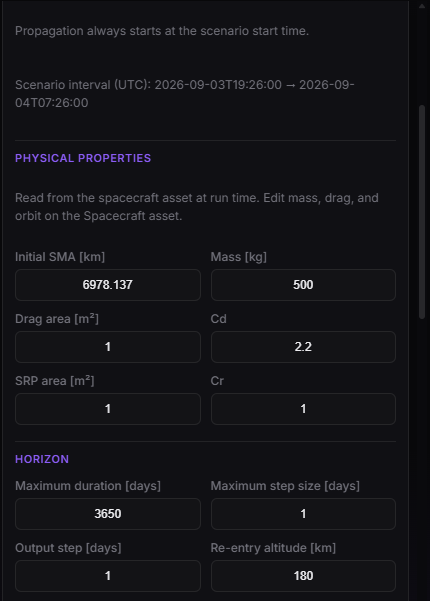
Lifetime Properties — spacecraft physical preview (read-only) and horizon.
Propagation and Environment
The force model for this analysis — not the spacecraft Generic propagator.
| Field (editor) | Meaning |
|---|---|
| Method | Locked to DSST Semi-Analytical. Numerical is not in Beta 0.1.0 for this study (unstable near re-entry). |
| Gravity degree / order | Earth gravity field truncation (default 8 / 8) |
| Include drag | Always on. Cd, drag area, and mass from the spacecraft apply here. |
| Include solar radiation pressure | Optional. Uses Cr and SRP area from the spacecraft. |
| Include third-body perturbations | Optional (Sun / Moon class). |
| Atmosphere model | e.g. NRLMSISE-00, DTM2000, Harris-Priester, Simple Exponential |
| Space weather source | CSSI Space Weather or Marshall Solar Activity Forecast |
| Solar activity scenario | Low, Moderate, High, or Compare All |
NRLMSISE-00 and DTM2000 read solar activity from the selected source, and the analysis starts at the scenario start. That instant plus the whole duration must fall inside that source. The two sources do not share an end date: the installed Marshall forecast stops in October 2041, while CSSI Space Weather follows SpaceWeather-All-v1.2.txt, which in the current data runs into 2096. A start in 2050 is allowed on CSSI and rejected on Marshall. Harris-Priester and Simple Exponential do not use these files.
Compare All runs Low / Moderate / High in one analysis so Dashboard can overlay the three decays.
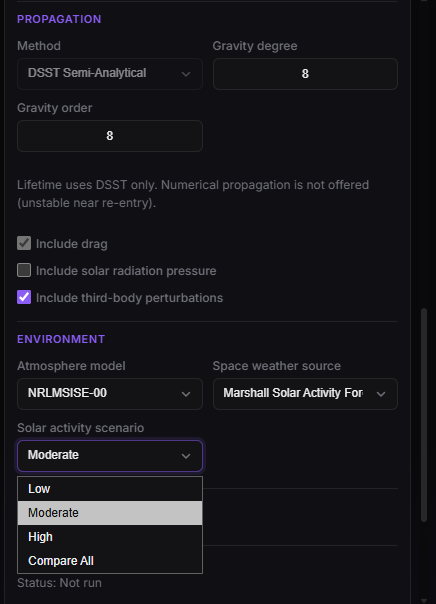
Lifetime Properties — DSST propagator, drag (always on), atmosphere, solar activity.
After Run
Dashboard: select this Lifetime analysis → altitude / decay. Design still shows the spacecraft on the scenario orbit; the multi-year decay lives in Dashboard, not as a 3D playback of decades.
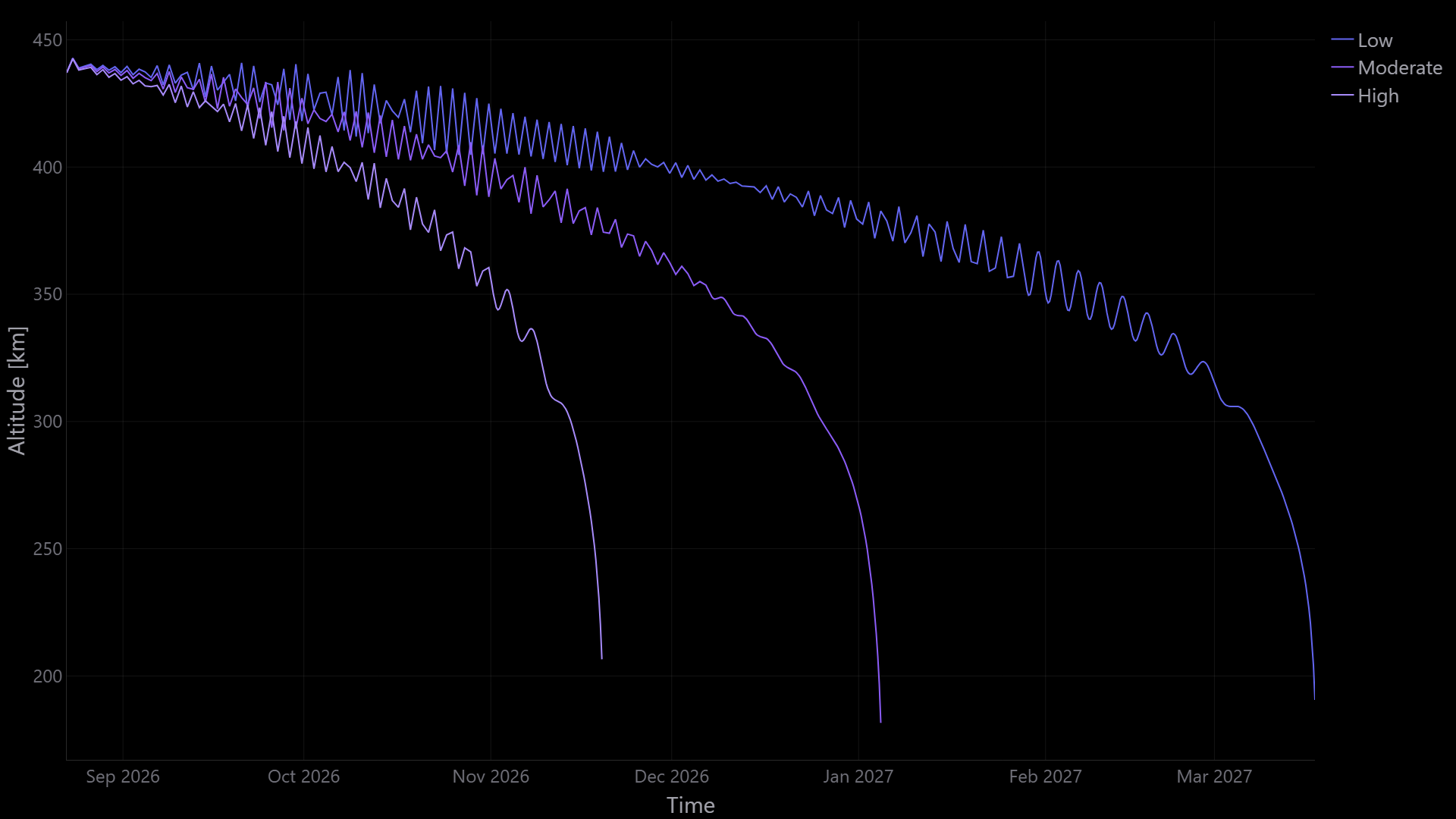
Dashboard — altitude vs time until re-entry or end of horizon (Low / Moderate / High when Compare All).
Very short life — low perigee, large area/mass (or Custom Assembly Max), high Cd, High solar activity.
Hits max duration without re-entry — life longer than the horizon; treat as a lower bound. Raise duration (if the plan allows) or read it as “still flying at the end of this window”.
Compare All — run once, then compare Low / Moderate / High products in Dashboard rather than guessing a single solar year.
Stale — orbit, mass, Cd, area source, Custom Design, or these fields changed on the spacecraft.