Transmitter
Asset reference
Concept
A transmitter is the RF source in a space–ground or cross-link budget.
- Simple — frequency, EIRP, polarization, and modulation. Implicit isotropic antenna; no Antenna asset.
- Complex — TX power plus a Linked antenna on the same parent (spacecraft, facility, or vehicle). Pattern gain and pointing come from that Antenna. Add the antenna under the parent first or the dropdown is empty. On ASTROLAB Web, Complex is available on every plan, including Trial, so the transmitter can be linked to an antenna. Plans and entitlements.
Link Analysis can run pure geometry between platforms, or enable link budget when the primary is a Transmitter and the secondary is a Receiver.
Common parameters
| Parameter | Type | Options |
|---|---|---|
| Name | text | — |
| Active | checkbox | — |
| Type | select | Simple / Complex |
| Linked antenna | select | Complex only. Antennas on the same parent. Hidden in Simple. |
Simple — RF Source & Modulation
| Parameter | Units / options | Default |
|---|---|---|
| Frequency | Hz / kHz / MHz / GHz | 2.2 GHz |
| EIRP | dBW / dBm / W | 40 dBW |
| Polarization | Linear / RHCP / LHCP | RHCP |
| Modulator | BPSK, BPSK-BCH, QPSK, 8PSK, 16PSK, DPSK, 2-FSK, 4-FSK | QPSK |
| Data rate | bps…Gbps | 1 Mbps |
| Signal bandwidth mode | Auto / Symmetric / Manual | Auto |
| Symmetric bandwidth | Hz/kHz/MHz | 1 MHz (if Symmetric) |
| Lower / Upper band offset | 0.5 MHz each (if Manual) |
Complex — adds
Requires Type = Complex. The editor then shows Linked antenna.
| Parameter | Default |
|---|---|
| Linked antenna | — (pick an Antenna on the same parent) |
| Power (W / dBW / dBm) | 10 W |
| Additional gain [dB] | 0 |
| Additional loss [dB] | 0 |
(Frequency, polarization, modulation block same as Simple.)
Effect on the link budget
These fields are read when a Link analysis has Compute link budget on. Angles are the direction from this transmitter toward the receiver.
| Setting | What it changes |
|---|---|
| Frequency | Carrier for free-space loss and Doppler. Free-space loss uses λ = c / f with c = 299792458 m/s. It does not reshape a linked antenna pattern. If it differs from the antenna design frequency by more than 10 %, the run prints a warning and still uses this frequency. |
| EIRP (Simple) | The radiated level, already including an implicit isotropic antenna. No Antenna asset is added on top. |
| Power (Complex) | EIRP = P_dBW + G_tx(θ, φ) + additional gain − additional loss. G_tx is the linked antenna toward the receiver. |
| Additional gain / loss | Decibels added to or removed from that EIRP (cables, filters, a known margin). Counted once, inside EIRP. |
| Polarization | Mismatch loss against the receiver. See the table below. |
| Modulator | Required Eb/N₀, implementation loss, and — in Auto bandwidth — the occupied bandwidth. |
| Data rate | Eb/N₀ = C/N₀ − 10 log10(R_b) − L_impl. A higher rate lowers Eb/N₀ by 10 log10 of the ratio. |
| Bandwidth mode | Auto: B = (R_b / bits per symbol) · (1 + roll-off), roll-off 0.35 except FSK. Symmetric / Manual: the bandwidth you type. The receiver uses this as its noise bandwidth while Auto track transmitter bandwidth is on. |
Polarization
RHCP is right-hand circular, LHCP left-hand circular, Linear is linear (horizontal and vertical are not separate). The loss is constant for the whole pass. It is applied only if the Link analysis has Include polarization loss on.
| Transmitter | Receiver | Loss |
|---|---|---|
| Same as the receiver | Same | 0 dB |
| RHCP | LHCP, or the reverse | 30 dB |
| Linear | RHCP or LHCP | 3 dB |
Modulator
A preset, not a waveform simulation. With Link Required Eb/N₀ left at 0, the threshold is this table. The receiver copies it while Auto track transmitter demodulator is on.
| Preset | Bits / symbol | Required Eb/N₀ | Implementation loss |
|---|---|---|---|
| BPSK | 1 | 9.6 dB | 0 |
| BPSK-BCH | 1 | 5.5 dB | 0.5 dB |
| QPSK | 2 | 6.5 dB | 0 |
| 8PSK | 3 | 11 dB | 0 |
| 16PSK | 4 | 14 dB | 0 |
| DPSK | 1 | 10.3 dB | 0 |
| 2-FSK | 1 | 9.5 dB | 0 |
| 4-FSK | 2 | 11 dB | 0 |
FSK bandwidth is 2 · deviation + symbol rate (50 kHz deviation for 2-FSK, 100 kHz for 4-FSK) instead of the roll-off formula. Implementation loss is subtracted from Eb/N₀, not from EIRP.
Link Analysis tip
For RF budget mode, set Link primary = Transmitter and exactly one secondary = Receiver.
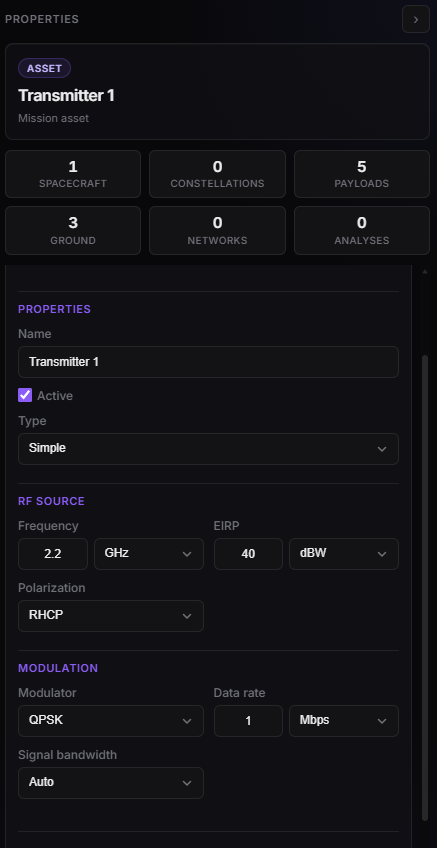
Transmitter Properties — Simple vs Complex RF source.