Receiver
Asset reference
Concept
A receiver is the RF front-end complementary to a transmitter.
- Simple — fixed G/T. Implicit isotropic antenna; no Antenna asset.
- Complex — noise figure plus a Linked antenna on the same parent. Pattern gain and pointing come from that Antenna. Add the antenna under the parent first or the dropdown is empty. On ASTROLAB Web, Complex is available on every plan, including Trial, so the receiver can be linked to an antenna. Plans and entitlements.
Auto-track options keep frequency, demodulator, and bandwidth aligned with the paired transmitter during early design. Together with scenario RF environment settings (ITU rain/gases or custom climatology), receivers close the budget side of Link Analysis.
Common parameters
| Parameter | Type | Options |
|---|---|---|
| Name | text | — |
| Active | checkbox | — |
| Type | select | Simple / Complex |
| Linked antenna | select | Complex only. Antennas on the same parent. Hidden in Simple. |
When Type = Complex, the editor shows Linked antenna (same parent as the receiver). Simple uses G/T only.
RF Front-End
| Parameter | Notes | Default |
|---|---|---|
| Frequency | Hz…GHz; disabled if auto-track TX | 2.2 GHz |
| Auto track transmitter | checkbox | on |
| Noise figure [dB] | Complex | 1.5 dB |
| G/T | Simple | 20 |
Demodulator
| Parameter | Default |
|---|---|
| Demodulator preset | QPSK (same list as TX modulators); disabled if auto-track |
| Auto track transmitter demodulator | on |
Noise bandwidth & polarization
| Parameter | Default |
|---|---|
| Noise bandwidth | 1 MHz (disabled if auto-track BW) |
| Auto track transmitter bandwidth | on |
| Polarization | RHCP (Linear / RHCP / LHCP) |
| Additional loss [dB] | Complex only, default 0 |
Effect on the link budget
Read when a Link analysis has Compute link budget on. G_rx(θ, φ) is the linked antenna gain toward the transmitter.
| Setting | What it changes |
|---|---|
| G/T (Simple) | Used as-is, in dB/K. It does not change with angle and does not use an Antenna asset. |
| Noise figure (Complex) | T_sys = 290 · 10^(NF/10) kelvin. Antenna noise temperature is not added. G/T = G_rx(θ, φ) − 10 log10(T_sys). |
| Additional loss | Subtracted on the path, after EIRP. It does not change G/T. |
| Polarization | Same mismatch table as the transmitter: 0 dB if both ends match, 3 dB for linear against either circular sense, 30 dB for RHCP against LHCP. Applied only if the Link analysis includes polarization loss. |
| Frequency | Ignored while Auto track transmitter is on: free-space loss and Doppler use the transmitter carrier. |
| Demodulator | Supplies required Eb/N₀ when the Link field Required Eb/N₀ is 0. While Auto track transmitter demodulator is on, this preset is ignored and the transmitter modulator is used. The numbers are on the transmitter page. |
| Noise bandwidth | C/N = C/N₀ − 10 log10(B). While Auto track transmitter bandwidth is on, B is the transmitter signal bandwidth. |
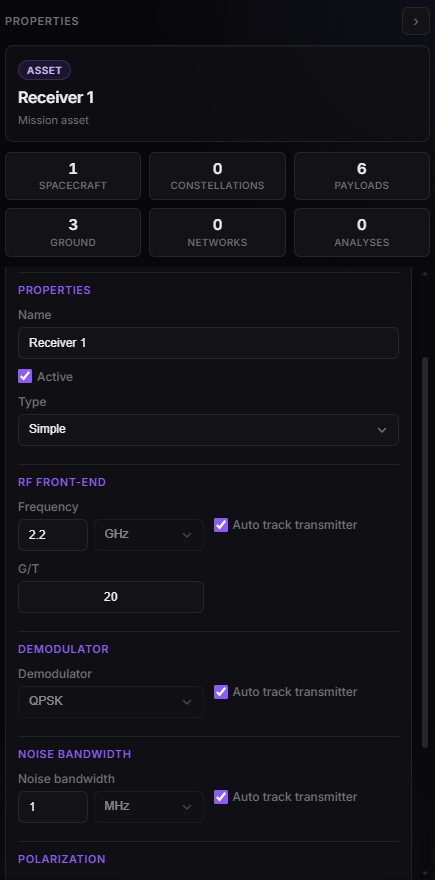
Receiver Properties — Simple G/T or Complex noise figure.