Constraints
Asset reference
Concept
Constraints are rule filters attached to platforms (spacecraft, vehicle, facility). They answer: under what geometric or lighting conditions may this asset participate in access?
They are first-class mission data. Engines that evaluate line-of-sight, coverage samples, or contacts consult applicable constraints. Misconfigured constraints are a common reason for “empty” access or coverage.
See also Flight dynamics — Access.
When to use
| Constraint | Typical intent |
|---|---|
| Range | Keep relative distance inside a band (e.g. max ISL range) |
| Ground elevation | Facility only counts inside a min/max elevation band |
| Eclipse | Require sunlight or eclipse for the platform |
| Target illuminated | Optical collect only when the target is lit |
| Sun zenith angle | Limit by ground lighting geometry |
| Altitude | Gate by platform height |
| Solar beta angle | Gate by orbit–Sun geometry |
Constraint types
| Type key | Label | Default parameters |
|---|---|---|
range |
Range | min_km: 0, max_km: 2000 |
ground_elevation |
Ground elevation | min_deg: 10, max_deg: 90 |
eclipse |
Eclipse state | state: not_in (not_in / in) |
target_illuminated |
Target illuminated | (none) |
sun_zenith_angle |
Ground sun zenith angle | min_deg: 0, max_deg: 80 |
altitude |
Altitude | min_km: 0, max_km: 2000 |
solar_beta_angle |
Solar beta angle | min_deg: -90, max_deg: 90 |
How engines apply them
At each sample time the access kernel evaluates geometry (LOS, FOV, elevation, …) and enabled constraints on the participating platforms. If any required constraint fails, the sample is not an access / coverage hit.
flowchart LR
  Geo["Geometry tests"] --> C["Enabled constraints"]
  C --> Ok{"All pass?"}
  Ok -->|yes| Acc["Access / sample valid"]
  Ok -->|no| No["Rejected"]
UI pattern
On spacecraft (Constraints tab) and vehicle:
- Choose constraint type → Add constraint.
- Toggle Enabled.
- Edit numeric parameters.
- Remove when obsolete.
On facility (Web): Add constraint seeds Range 0–2000 km; you can change type and Remove. Enabled and numeric fields are not shown on that editor.
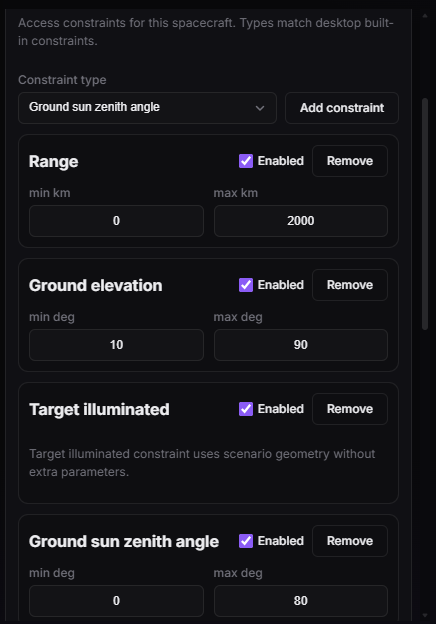
Spacecraft Constraints tab — elevation (or other) mask with Enabled.
Design tips
- Start with ground elevation on facilities before blaming the propagator.
- Pair eclipse / illumination with optical sensors deliberately — they silently zero night collects.
- Wide range caps are safer while debugging; tighten later for operational realism.
- Disabled constraints remain in the document but are ignored by engines.