Space object
Asset reference
Concept
A space object asset brings catalog / debris populations (TLE-based) into the mission as situational context in Design. It is not a substitute for the Spacecraft editor’s orbit design and payload tree.
Today that catalog is a visual layer: populations and individual NORAD rows you include appear in the scene so you can see debris and other objects next to your designed satellites. They do not yet participate in Coverage, Link, Latency, or other analyses.
When the SSA (Space Situational Awareness) module opens, the same selections — whole populations and per-object Include — will feed those analyses (catalog conjunction / environment studies). Until then, treat Space object as a 3D catalog viewer you can already configure.
Parameters
| Parameter | Type | Options / notes |
|---|---|---|
| Name | text | |
| Visible | checkbox | Mirrors active |
| Population ID | text | |
| Render mode | select | Currently points |
| Color | color | default #FF3333 |
Population files
Two-panel picker (Available / Selected) of bundled debris / catalog population files.
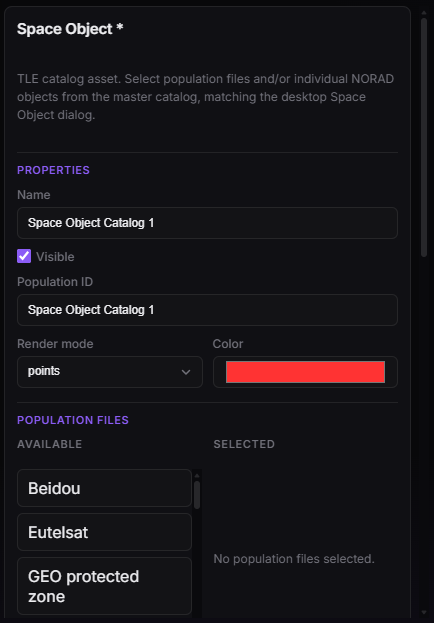
Space object — name, render mode, and population-file picker.
Master catalog
Searchable table (NORAD, Name, Epoch, Inc, Alt) with a per-row Include checkbox — client list capped (e.g. 250 rows). Toolbar: Select all [matches] / Clear selection.
Checking Include on an individual debris / NORAD row is the same visual contract as picking a population file: the object is drawn in Design. It is not yet an analysis input. When SSA ships, those included objects become the catalog you study, not only the cloud you look at.
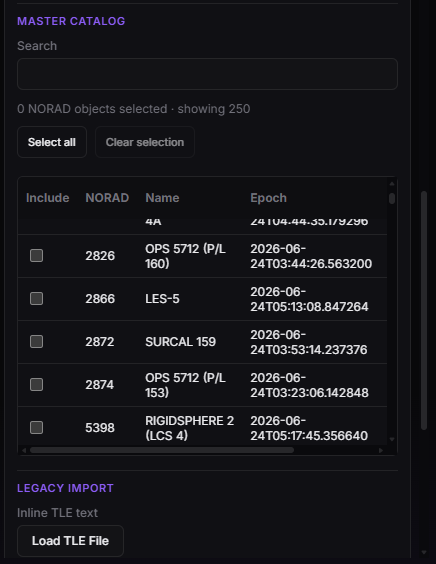
Space object — master catalog, per-object Include (visual now; SSA analyses later).
Legacy import
| Control | Accept |
|---|---|
| Load TLE File | .tle, .txt, .3le |
| Inline TLE text | textarea |