Power
Arrays, batteries, and loads over the orbit
Power is the electrical energy balance on one spacecraft: what solar arrays produce (eclipse and incidence), how batteries charge and discharge, and whether loads stay up under your policy.
It does not answer where the satellite looks, and it does not size RF. Coverage, Link, and Latency stay on their own pages. Configure arrays on the spacecraft Power tab and packs on Battery first. If Properties says there are none, add them on the spacecraft before you run.
Add from Mission Tree → Analysis → Power. You need at least one array and one battery selected.
Walkthrough: Power budget
Beta 0.1.0 — first energy-balance cut
This study is solar arrays + battery packs + scheduled electrical loads. More load types and operational cases (payload-coupled draws, extra sources and storage) are planned for later builds. Treat this page as the Beta 0.1.0 slice, not the full power suite.
Surplus in sunlight fills the pack. Eclipse draws it. Shedding is the policy when the bus cannot keep up.
When to use
| Use Power when… | Prefer something else when… |
|---|---|
| Sizing arrays, batteries, or a load budget through eclipse | Area coverage → Coverage |
| SOC margins, shedding, shortfall windows | RF margins → Link with budget |
| A first-cut bus energy story in Beta 0.1.0 | Uncontrolled lifetime → Lifetime |
Hardware on the spacecraft
Power Analysis selects hardware; it does not create it.
| Piece | Where you edit it | Role in the run |
|---|---|---|
| Solar array | Spacecraft Power tab | Generation: area, efficiency, mount, optional SADM / sun-tracking |
| Battery | Spacecraft Battery tab | Storage: capacity, SOC limits, charge/discharge caps, chemistry preset |
| Loads | This analysis | Demand: watts, mode, duty, priority — not a child asset in Beta 0.1.0 |
Changing array geometry, efficiency, capacity, or SOC limits on the spacecraft makes a completed Power run stale.
Generic (spacecraft and sources)
Top of the editor: identity, which bus, which arrays, and how sunlight is modelled.
| Field (editor) | Meaning |
|---|---|
| Analysis name | Name in the tree and Dashboard |
| Active | Off → skipped on scene refresh |
| Spacecraft | The bus under study. Arrays and batteries listed below are children of this spacecraft. |
| Power Sources | Check which solar arrays participate |
| Solar flux mode | How many W/m² hit the panels — below |
| Custom solar flux W/m² | Used when mode is Custom (default 1361) |
| Include eclipse | On (default): generation drops in Earth shadow. Off: sunlight all interval (isolates a term). |
| Include incidence angle | On (default): cosine / pointing / SADM from the array. Off: flux × area × efficiency with no cosine. |
| Interval | Follows the scenario window, or a custom span |
| Time step s | How often the balance is stepped (default 60) |
Leave Include eclipse and Include incidence angle on unless you are isolating a term.
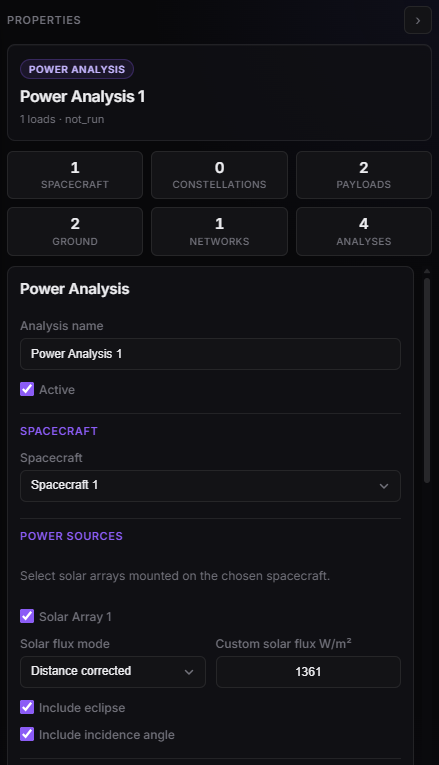
Power Properties — spacecraft, solar arrays, flux, eclipse, incidence.
Solar flux
| Mode (editor) | What the engine uses |
|---|---|
| Distance corrected | Default. AM0-class 1361 W/m² scaled by (AU / Sun distance)² |
| Constant | Flat 1361 W/m² — no distance term |
| Custom | The Custom solar flux W/m² field as a constant |
Generation per selected array is that flux, times area and efficiency, then (if incidence is on) the panel’s pointing. Eclipse zeros it when the bus is in Earth’s shadow.
Energy Storage
Which packs participate, how they start, and what they are allowed to do. Charge/discharge rates and SOC floors still live on the battery asset; this panel is the run policy.
| Field (editor) | Meaning |
|---|---|
| Energy Storage | Check which batteries participate |
| Initial SOC mode | Use battery asset value (each pack’s Initial SOC) or Override all batteries |
| Initial SOC % | Applied to every selected pack when you override |
| Override initial SOC | Same override, as a checkbox — either this or Override all batteries forces Initial SOC % |
| Allow battery charging | Off → surplus solar cannot refill the pack (eclipse-only drain study) |
| Allow battery discharging | Off → loads cannot draw from storage (sunlight-only / no-battery-assist) |
| Enable load shedding by priority | Drop lowest-priority loads before recording a deficit — Loads |
| Include battery capacity degradation | Optional linear fade from the pack’s Capacity degradation [%/yr] |
SOC is clipped to that pack’s Min / Max SOC. The engine will not discharge below the min floor.
Global Policy
| Field (editor) | Meaning |
|---|---|
| Negative SOC policy | What happens when solar + allowed discharge cannot cover the remaining load |
| Policy | Behaviour |
|---|---|
| Mark deficit | Default. Keep running; flag unmet watts. Use this to see how far SOC and shortfall go. |
| Stop analysis | Halt at the first unmet sample. Switch to Mark deficit if you need the rest of the interval. |
A deficit above the SOC floor is usually a discharge-rate cap (max discharge watts on the pack). A deficit on the floor means the battery is empty for practical purposes.
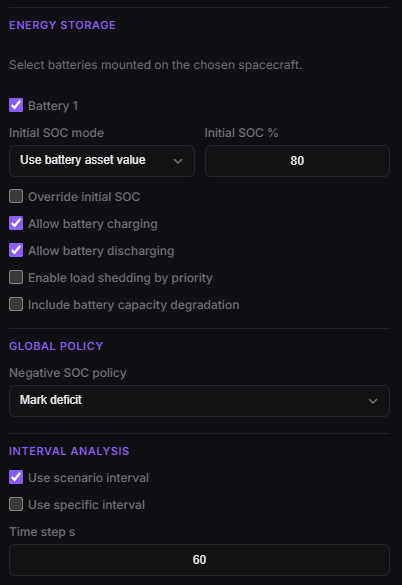
Power Properties — batteries, initial SOC, charge/discharge, shedding, negative-SOC policy.
Loads
Loads are scheduled electrical draws on this analysis, not child assets. In Beta 0.1.0 each load is a name, a wattage, a mode, optional duty, and a priority. Later builds will add more types and operational cases; the modes below are the current set.
Add load creates a card (default 10 W, Always On, duty 100%, priority 5). Uncheck Enabled to keep the card without drawing. Duty cycle % is used only by the two duty-cycle modes.
| Field (editor) | Meaning |
|---|---|
| Enabled | Off → that load draws 0 |
| Name | Label in Dashboard / reports |
| Power W | Instantaneous draw when the mode says the load is on |
| Mode | When that wattage is requested — below |
| Duty cycle % | Average Duty Cycle and Duty Cycle per Orbit only (0–100) |
| Priority | 1–10. 1 is shed first; 10 is kept longest. Used only if shedding is on. |
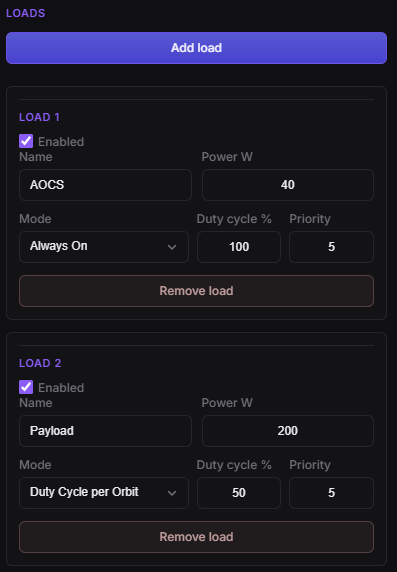
Power Properties — load cards (watts, mode, duty, priority).
Load modes
The engine asks each enabled load for watts at every time step. Requested load is what the modes produce. Delivered load is what remains after shedding (if on) and what the bus can actually supply.
| Mode (editor) | When it draws Power W | Typical use |
|---|---|---|
| Always On | Whole interval, sunlight and eclipse | Bus / avionics / always-on payload |
| Sunlight Only | Only while not eclipsed | Daylight payload; off in shadow |
| Eclipse Only | Only while eclipsed | Heaters / survival in shadow |
| Average Duty Cycle | Constant Power W × duty/100 at every step |
Mean budget when you do not care when it switches |
| Duty Cycle per Orbit | Full Power W for the first duty% of each orbit period, then 0 until the next |
A square wave aligned to analysis start, not to eclipse |
Duty Cycle per Orbit uses the spacecraft’s orbital period at the start of the run. 100% is the same as Always On; 0% draws nothing. It is not the same as Average Duty Cycle: average is a scaled continuous draw; per-orbit is on/off each revolution.
Sunlight Only / Eclipse Only follow the same eclipse flag as generation. If Include eclipse is off, those two modes never see shadow (Sunlight Only stays on; Eclipse Only stays off).
Shedding
Enable load shedding by priority is off by default. The checkbox is not decorative: when it is on, the integrator really cuts demand before it charges or discharges the battery.
At each step the engine:
- Builds requested watts from the load modes.
- If shedding is off, requested = delivered. Unmet watts after the battery step become deficit.
- If shedding is on, it compares requested to solar + max discharge rate of packs still above their SOC floor. From priority 1 upward it cuts (a load can be partially shed) until the remainder fits, or every load is gone.
- Delivered watts are what then hit the bus and the SOC curve. Dashboard Power Load Shedding reports shed energy per load.
Shedding can still leave a deficit: the shed test uses the pack’s Max discharge [W] (and whether any energy sits above the floor), then the battery step also applies efficiency and remaining watt-hours. A leftover is the usual discharge-rate / empty-pack case, not a sign that shedding was ignored.
Priority is unused while the checkbox is off.
After Run
Dashboard: select this Power analysis — Battery SOC, Solar Power by Array, Power Balance, shortfall / shedding tables. Design still shows the live orbit; the study itself is a Dashboard product.
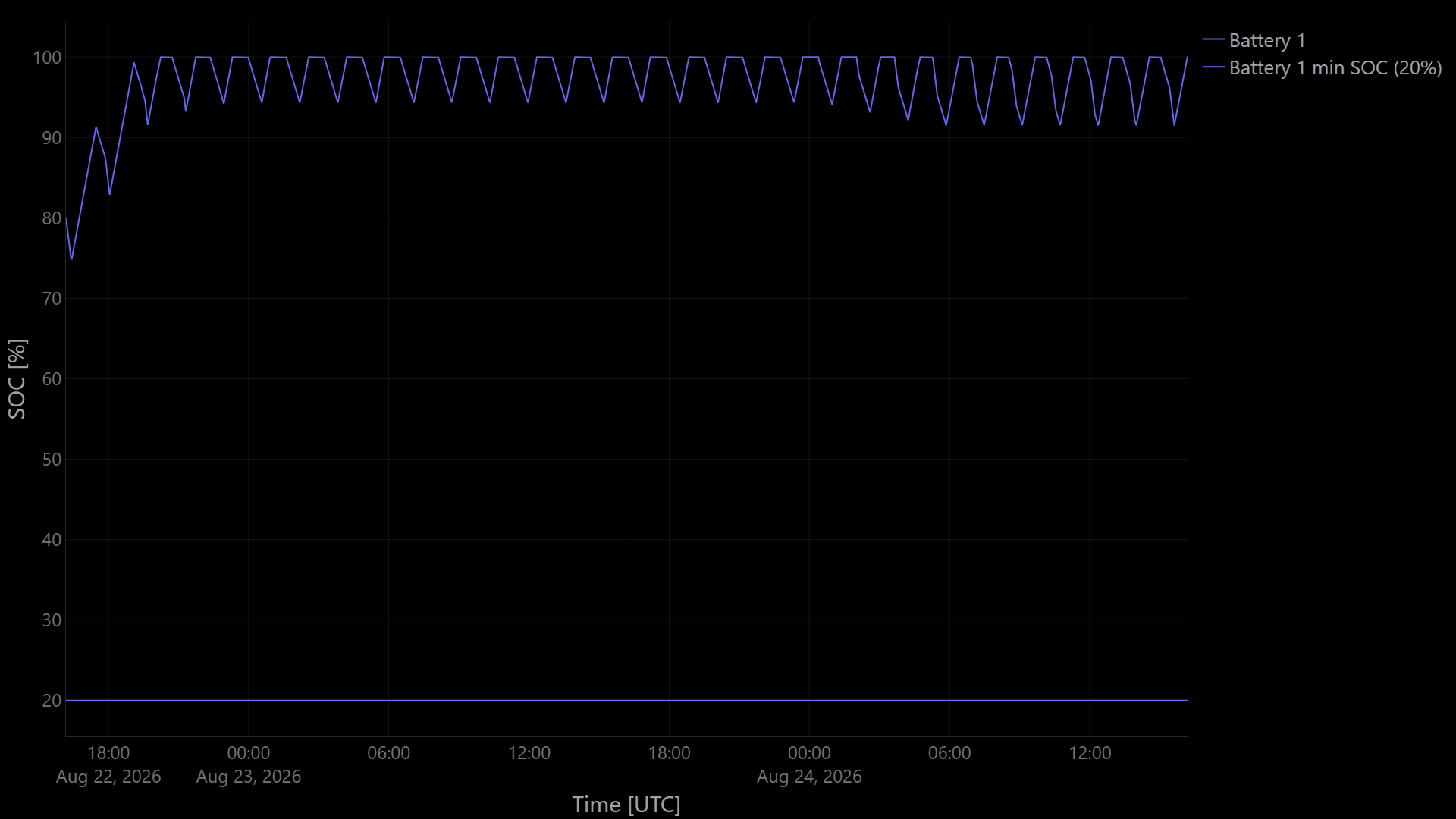
Dashboard — battery state of charge over the interval (floor is the pack min SOC).
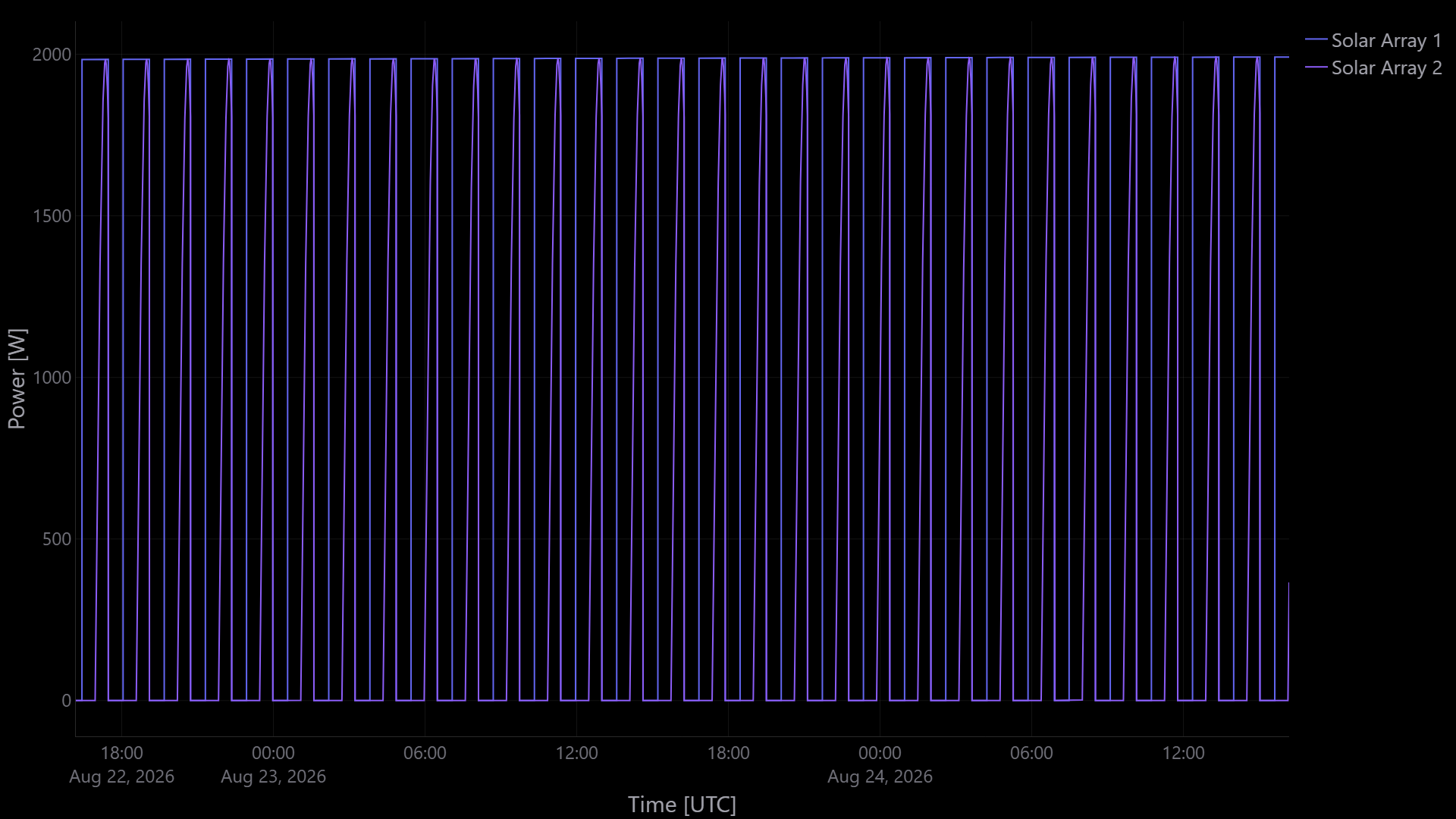
Dashboard — Solar Power by Array: generation of each selected solar array vs time (eclipse notches at 0 W).
Chronic deficit — undersized arrays, heavy eclipse loads, or thin capacity.
SOC sitting on the minimum — reduce loads, grow storage, or turn on shedding; the floor is doing its job.
Deficit while SOC is still high — Max discharge on the pack is the usual cap, or Allow battery discharging is off.
Stops immediately — Stop analysis hit the first unmet sample; switch to Mark deficit.
Sunlight-only load never drops / eclipse-only never turns on — Include eclipse is off.
Stale — spacecraft, arrays, batteries, or these fields changed after the run.